RevEngine AI features
Video guide: Inspect RevEngine controls in the recorded demo release
Recorded November 11, 2026 in the fictional Summit Managed IT staging workspace, App 0.432.427. The deployed demo can differ from the current product; use the written guide for current behavior. Read-only recorded-release capability tour; no provider calls, generated output, enabled actions or endpoint outcomes.
Full narration captions are included in the video. Open video full screen · Download subtitles · Download transcript
Video transcript
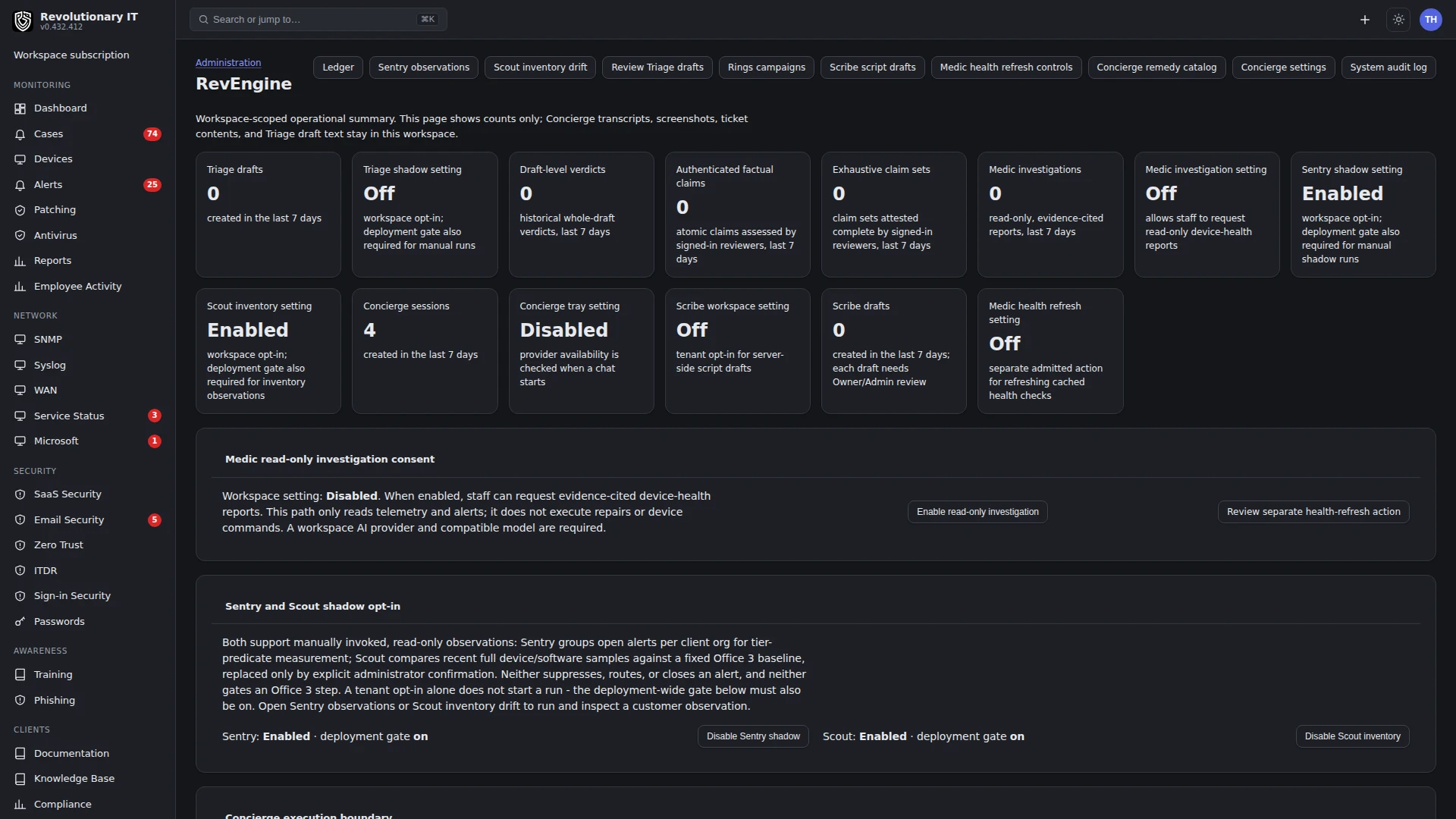
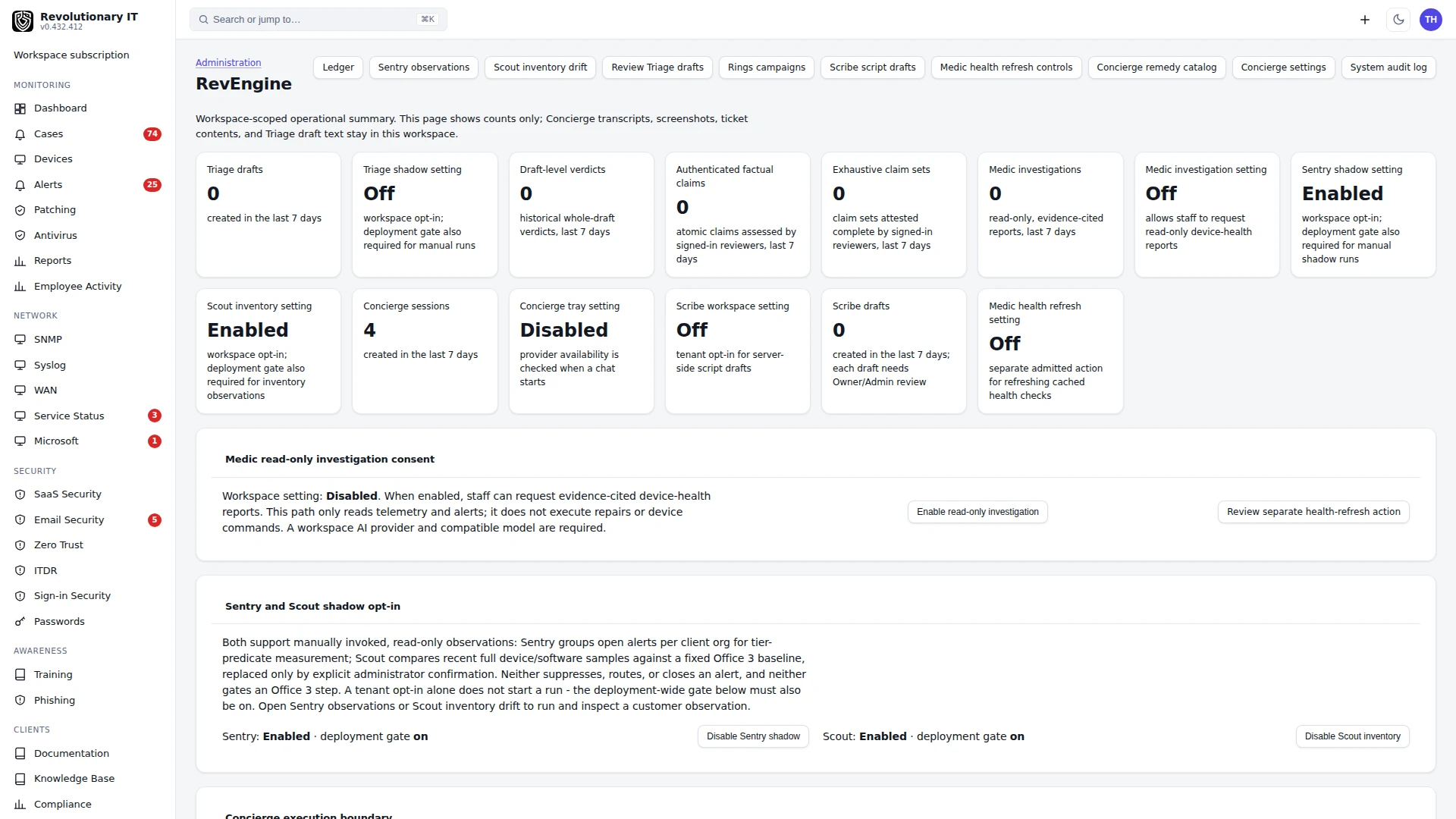
Open Administration, RevEngine. Read capability status for the recorded demo release and check the current written guide for changes. Counts are workspace-scoped. These demo activity counts are zero; an available settings page is not proof of a completed AI investigation or a successful device fix.
Open Scribe script drafts. Scribe is disabled in this workspace. When configured and enabled, generation calls the workspace provider and creates a SYSTEM-account script draft. An Owner or Admin must review the complete exact artifact before admission. Admission is not execution.
Return to RevEngine and read Medic in the capability table. Medic investigations are read-only; the separate admitted refresh action does not repair the underlying condition.
The Ledger holds bounded hash-linked receipts for supported workflows. A receipt can establish a recorded proposal or admission without proving endpoint success. Inspect the relevant result and later device evidence. No AI provider was called and no workspace action was enabled for this recording.
Video guide: Read Rings authorization limits and Ledger receipts
Recorded November 11, 2026 in the fictional Summit Managed IT staging workspace, App 0.432.427. The deployed demo can differ from the current product; use the written guide for current behavior. Read-only authorization and receipt orientation; no campaign proposal, authorization, dispatch or export.
Full narration captions are included in the video. Open video full screen · Download subtitles · Download transcript
Video transcript
Open RevEngine, Rings campaigns. A proposal captures scope and a workload-matched canary baseline. A separate Owner or Admin review authorizes the exact stored manifest. Read the page carefully: campaign execution is not connected and no patch deployment is available through Rings. STOP cancels queued Rings installs, a command already picked up may finish, and STOP does not uninstall updates.
The page requires current telemetry, recent canary heartbeats, build and workload tags, pending patches on all targets, and a continuous twenty-four-hour baseline. The offline training inventory cannot satisfy these prerequisites. We leave the proposal form unchanged and do not claim a campaign was accepted.
Open Ledger to inspect the receipt list and chain status. Hash-linked receipts cover selected RevEngine workflows; full action coverage and backup-restore acceptance remain incomplete. A recorded authorization is not a dispatched job, and a chain status is not a successful endpoint patch installation.
What it does
An optional model connection that powers: Ask AI on tickets, alerts and syslog events (advice only, with the record's context); Investigate the device on an alert (root cause, evidence, urgency, next steps from metrics, recent commands and syslog); the security card summary of failed sign-ins; patch severity refinement with web research and citations; RevEngine Triage, an owner-only pilot that is not generally available and prepares evidence-linked draft replies for factual review; and RevAssist from the agent tray (a device-bound troubleshooting chat that uses reported device context, can ask for a screenshot with the user's approval, can propose library scripts that run only after the user approves them, and records exchanges on a support ticket).
How it works
- Keys and models: Administration > Apps > API > AI: the provider key (Anthropic), the model picker (built-in list plus Refresh models from the provider), and a Connect button (Save & test once a key is saved) that checks the key. Requests use per-model capability handling; unsupported model, parameter and provider errors can still occur and must be checked.
- The product attempts to record model activity under Administration > Logs > AI Activity with the associated record where applicable; a Past AI answers history is available on supported panels. Verify the activity/result rather than assuming logging cannot fail.
- RevAssist uses a device-bound token minted by the tray. It talks with the user about the problem using the device's reported facts, can ask for a screenshot of the desktop with the user's approval, and can propose a script from the workspace library or write one. Nothing runs on the computer until the user approves it in the chat; every message, script, output and screenshot lands on a ticket linked to the device, where a technician can take over.
- Model replies do not change configuration by themselves. A script proposed in the chat runs only after the user approves it, and it runs as the signed command the technician would see for any other script.
Providers, drafting and action boundaries
The AI settings UI says current AI features execute through the Anthropic key. Other provider keys can be stored/verified without establishing that feature execution uses them. A connected badge or successful model-list call is not an accepted ticket investigation. Confirm supported provider/model, feature setting, usage and actual output.
RevEngine Triage
Triage is a supervised owner-only ticket-drafting pilot and is not generally available. The pilot is observational: the two founders are the participants and review each other's items (nobody approves their own), and technician time and quality are recorded per ticket with and without Triage as the work happens. There is no pass/fail bar. Results describe two technicians at the founders' own MSP and do not generalize to other teams or establish general time savings. Eligible open tickets can produce evidence-linked reply drafts for factual review in the workspace admin interface. A draft is advisory: it is not shown to the customer, sent, or an action. The pilot does not authorize customer access. Any separate use of customer ticket content by an AI provider requires explicit workspace opt-in. Check each factual claim against its cited evidence, then use the ticket’s normal human reply workflow.
Scribe is at Administration > RevEngine > Scribe (/admin/revengine/scribe), OWNER/ADMIN only and disabled by default. It generates a SYSTEM-account script draft with request/model/hash/usage and an artifact receipt. A reviewer must inspect the complete exact artifact and admit or reject it. Admission creates a Library entry; it does not queue or execute a device command. Model output can be wrong or unsafe despite a valid receipt.
RevEngine Sentry is at Administration > RevEngine > Sentry (/admin/revengine/sentry), OWNER/ADMIN only and off by default. Turning the workspace setting on enables shadow observation only, and only while the deployment gate is on. A shadow run examines one customer's open alerts, keeps the source-alert window and writes an audit receipt. A customer with fewer than two related alerts is reported as no work, which is a valid result and not a failure. Sentry does not group, route, suppress, close or contain alerts, and it proposes no root cause. Quality measurements for any higher tier are not established, so treat a receipt as an observation record.
RevEngine Scout is at Administration > RevEngine > Scout (/admin/revengine/scout), OWNER/ADMIN only and off by default. It captures a customer's onboarding inventory (operating system and software) as a fixed baseline and later compares devices against it, with version evidence and Ledger receipts. Every device needs a full software sample no more than two hours old. A missing, stale, malformed or capped sample makes the comparison inconclusive and keeps the existing baseline; it is never treated as a match. A customer with no devices and no baseline is reported as no work. Only an explicit administrator confirmation replaces a baseline, and a baseline captured by an older event-based collector must be reviewed and replaced that way before drift is trusted. Scout does not enforce onboarding or change any endpoint.
RevEngine Rings is at Administration > RevEngine > Rings (/admin/revengine/rings). An Owner or Admin can authorize an immutable, signed campaign manifest that names each cohort ring, the patch snapshot, thresholds, telemetry freshness requirements and a recovery policy. Authorization records the plan and its receipts. Dispatching patches, cancellation, observation, automatic expansion, STOP and recovery are not connected, so Rings installs nothing; ordinary Patching is a separate feature and is not Rings acceptance.
RevEngine Medic is at Administration > RevEngine > Medic (/admin/revengine/medic). Workspace administrators can turn on evidence-cited, read-only device-health investigations that cite their evidence. A separate workspace setting and an Owner/Admin admission of the exact catalog entry can also allow a signed refresh of cached update, antivirus and error checks. Each refresh is bound to one tenant, one device, empty parameters, a privilege level, the catalog digest, an expiry and a one-time replay claim. The refresh counts as successful only after a later device heartbeat clears every alert linked to it. Medic does not repair the underlying condition. Turning the setting off blocks future dispatch and cancels queued actions, although a command already sent may still finish.
Ask AI replies, Scribe admission and actual endpoint execution are different outcomes. Do not grant broad script execution on the strength of a chat reply; the end-user assistant's own scripts run only after the user approves each one.
RevEngine Ledger
Ledger presents hash-linked receipts for selected RevEngine workflows. Review the recorded action, actor, status, time and supporting context, and check the chain status for the covered records. Coverage is action-specific: a valid hash chain establishes integrity of the receipts it contains, not complete coverage of every product action or a successful endpoint outcome. Confirm the workflow’s own result record.
Steps
- Administration > Apps > API > AI: paste the key, Verify, pick a model supported by that feature/provider configuration. The configured picker and runtime model selection, not a hard-coded model name in this guide, determine the request. The key needs API credits; a passing verification does not establish credits, quota or that a real feature request will succeed. Read the actual billing/rate-limit/provider error and recorded usage.
- Administration > General > Systray: turn on “RevAssist” for end users if wanted.
Verification
- Ask AI on a ticket returns an answer and a row appears under Logs > AI Activity.
- Monitoring > Patching shows AI review verdicts with sources after the next scan.
- During the owner-only Triage pilot, confirm an eligible ticket has an evidence-linked draft in the workspace admin review view. This does not send a reply. Triage is not generally available; customer workspace opt-in does not grant access.
- For Ledger, confirm the selected action has a receipt and the chain verifies. Check the workflow outcome separately.
Troubleshooting
- "failed" in the panel: read the returned provider/model error and usage. Invalid credentials, exhausted quota, unsupported models/parameters and provider failures are possible causes.
- Patch severities do not change: check whether AI review is enabled/eligible, collection completed, the provider request succeeded and the result has evidence. Lack of funds is one possible cause; do not replace/fund credentials blindly.