

Documentation and assets
IT documentation, credentials and asset inventory
For MSP teams tired of runbooks in one tool and passwords in another. Documentation lives beside the devices it describes, credentials are encrypted and audited, and the inventory is built from what the agents and relays already report.
Inside Revolutionary RMMDevices
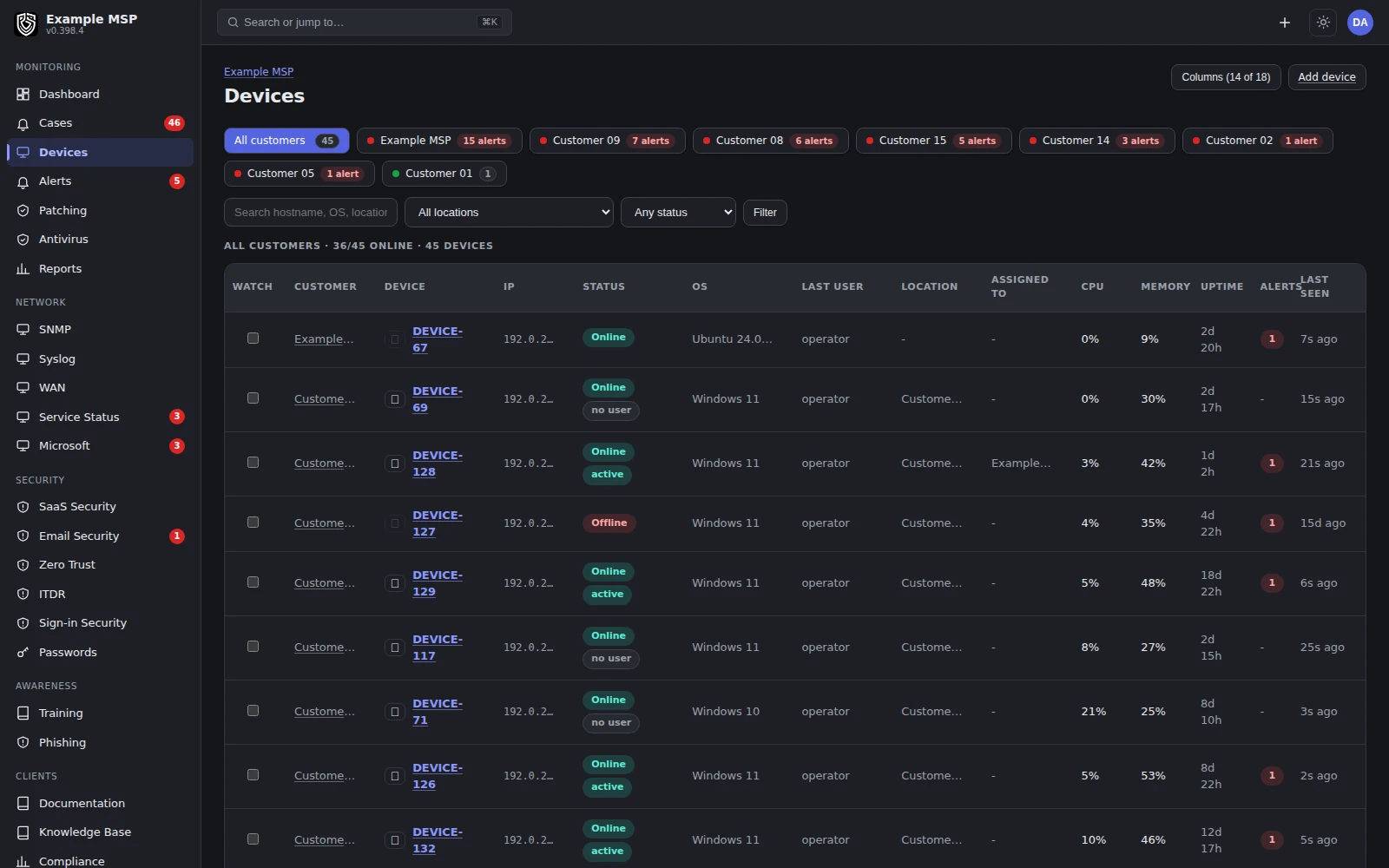
Devices by customer, as their agents report them. Product capture with fictional customer names.
What it does
Structured, not a wiki graveyard.
01 / STRUCTURE
Sections and pages.
Each customer gets tabbed sections holding notes, formatted documents, data tables and checklists that keep their tick state.
02 / LINKS
Linked to the real thing.
Relate a document to a device, an asset or a credential, and the backlink appears on both sides.
03 / HISTORY
Version history.
Revisions are captured as you go. Preview any version, copy it, or restore it.
04 / EXPORT
Exports that leave secrets out.
Documentation exports to spreadsheet, comma-separated and PDF formats without the stored credential secrets.
05 / CUSTOMERS
Customers can contribute.
A customer's own administrator can add and edit documentation for their organization in the portal. Credentials, deletions and revision management stay with your team.
06 / INVENTORY
One asset list, three sources.
Agent-managed computers, SNMP network gear and anything you add by hand, in one inventory with the same filters and exports.
How it works
The inventory fills from work you already do.
01
Agents report computers
Each managed computer reports its own make, model, serial number and address.
02
Relays report the network
SNMP nodes add switches, routers, printers, storage and battery backups.
03
You add the rest
Anything without an agent or SNMP, such as a phone system or a door controller, goes in by hand.
04
Document and link
Write the runbook, link it to the devices and credentials it covers, and the backlink shows on each of those records.
Credentials
Encrypted at rest, and watched.
ENCRYPTION
AES-256-GCM at rest.
Stored secrets are encrypted with AES-256-GCM, and the key is kept outside the database.
AUDIT
Reveals are recorded.
Revealing a stored credential in the app creates an audit event naming the person and the record.
EXPORTS
Stated once, plainly.
Documentation exports never include stored credential secrets. A personal vault export does include passwords, so treat that file like the vault itself.
END USERS
A private vault of their own.
Your customers' people get a separate personal vault in the portal, apart from the credentials your team manages.
Limits
What it does not do yet.
Limits
- There is no self-serve export of a whole workspace yet. Documentation exports are available today.
- Each asset record comes from one source. The agent view and the SNMP view of the same box are not yet joined into one identity.
- Customer administrators can edit documentation, but not credentials, deletions or revision history.
- Not for you yet if you need one merged record per device across every source today.
Not in the product today: one connected asset record across agent, network, mobile and manual sources, and a stable public API with full data export.
Questions
Good to know.
They are encrypted at rest with AES-256-GCM, with the key kept outside the database. Revealing one creates an audit event that names who revealed which record.
No. Spreadsheet, comma-separated and PDF exports of documentation leave the stored secrets out. Only a personal vault export includes passwords.
Yes. A customer's administrator can add and edit documentation for their organization in the portal. Credentials, deletions and revision management stay with your team.
From three sources: the agents on managed computers, SNMP polling of network gear through a site relay, and records you add by hand. All three share one list, filters and exports.
Yes. Every page keeps its revisions. You can preview an older version, copy from it, or restore it.
Keep exploring
Limits, checked daily
Not in the product today.
Each line below is a gap recorded against this capability in the product's own feature record. A line leaves this page by itself on the next daily run once that record says the gap is closed, so the list cannot fall behind what we ship. The rest of this page is written by hand.
- Your own fields can be added to tickets, and devices carry tags; customer, site and device records do not take custom fields yet.
- A device can be assigned to a person, and there are no lifecycle states such as in stock, on loan or retired, and no record of who held the device before.
- A device rebuilt under the same name keeps its record; one that comes back under a new name arrives as a second device, and the old record is retired by hand.
Next step
Show us where your documentation lives today.
Half an hour on a call. We will walk through how it would sit beside your devices and credentials.
