

The platform
The Revolutionary RMM platform
One workspace for MSPs: monitoring, patching, remote support, identity, service desk and documentation. An issue keeps its device, customer and history from the first alert to the invoice.
Inside Revolutionary RMMDashboard
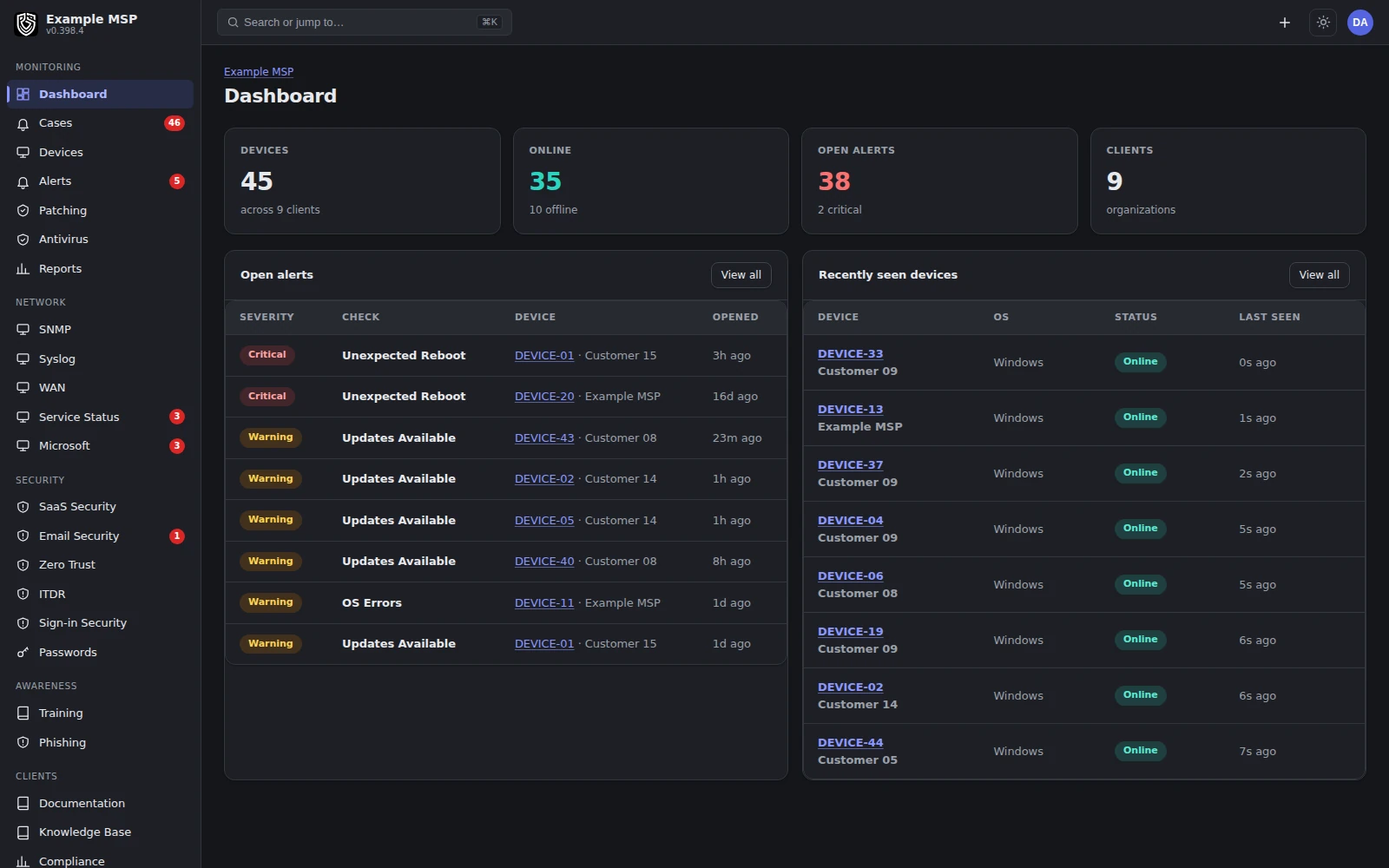
The workspace dashboard: fleet health, open work and what changed, across every customer. Product capture with fictional customer names.
Monitor and maintain
Keep endpoints healthy.
01 / MONITORING
Monitoring and alerts.
Health checks, per-customer thresholds, and alerts that close themselves when the condition clears.
02 / PATCHING
Patch management.
See missing operating-system updates, deploy them per device or across a customer, and exclude what should wait.
03 / NETWORK
Network monitoring.
SNMP v2c and v3, syslog, internet circuits and cloud provider status, beside the endpoints they serve.
04 / AUTOMATION
Automation.
A Windows script library, your own PowerShell or shell scripts, schedules and signed commands.
Secure and respond
Act on real risk.
05 / IDENTITY
Identity security.
Microsoft 365 and Google Workspace sign-in signals, with block, revoke and suspend responses.
06 / MICROSOFT 365
Microsoft 365.
Secure Score, posture findings, license waste, connected apps and Intune actions per customer.
07 / ENDPOINT
Endpoint protection.
Antivirus state across customers, network isolation that keeps the agent connected, BitLocker, and recovery for a device you cannot get back.
08 / MOBILE
Mobile devices.
Apple enrollment and management; Android Enterprise once your Google connection is set up.
Support, document and bill
Run the service.
09 / REMOTE
Remote control.
A native controller that reaches the Windows login screen, with file transfer in both directions.
10 / SERVICE DESK
Service desk.
Email, portal and text message tickets with the device and its history already attached.
11 / DOCUMENTATION
Documentation and assets.
Runbooks, encrypted credentials with audited reveals, and one asset inventory.
12 / BILLING
Billing and reporting.
Ticket time that becomes an invoice at your processor, quotes, and activity reports your customers can read.
Where it runs
Plan around your environment.
WINDOWS
Windows 10 and 11, Server 2016 and later.
Silent EXE or MSI installer for Group Policy, Intune and SCCM. Server 2012 R2 and older cannot run the agent; monitor them over SNMP instead.
MACOS
Intel and Apple silicon.
Installed from an installer package.
LINUX
glibc 2.31 and later.
Mainstream distributions, X11 and Wayland desktops. Shell installer, running under systemd or OpenRC.
NETWORK DEVICES
SNMP v2c and v3, syslog.
Polled through a relay on a machine you already manage. No agent on the device.
APPLE MOBILE
iOS and iPadOS.
Enrollment profiles, using your own Apple push certificate.
ANDROID
Android Enterprise.
Needs your workspace's own Google service account and enterprise connection. Built, not yet used in the field.
Operating system floors checked against the agent documentation, September 2026.
Built on
Separation, signatures and records.
ISOLATION
A database per workspace.
Each MSP workspace has its own PostgreSQL database and database role. Inside it, access follows assigned roles and customer scope.
SIGNATURES
Signed commands and updates.
Supported agent commands carry a signature the agent checks before running them. Agent updates are signed and version-checked.
SECRETS AND SIGN-IN
Encrypted secrets, two-factor sign-in.
Stored secrets use AES-256-GCM with the key kept outside the database. Two-factor authentication is required for staff password sign-in; single sign-on relies on your identity provider.
Not claimed yet. No SOC 2 report, no penetration test, no cyber insurance and no contractual SLAs. Support is 24/7, and it is the founding team who answers at any hour rather than a staffed operations center on a shift rota, so there is no contractual response time. We say so up front so your review starts from facts.
Product direction
What we are building next.
Not in the product today: one connected asset record across every source, versioned and reviewed automation, and a stable public API with signed webhooks and full data export.
The platform today
Counted from the product, not written by hand.
31 capability areas are running on production today, on version 0.399.0. Every capability area in the product source is running on production. Inside those areas, 92 individual features are recorded as built. The capability areas are counted from the product source code, one for each working area the product ships. The individual features are the single line items inside those areas, counted from the product feature record, the same record that publishes the "Not in the product today" limits on each capability page; a line counts only once the work is in the product. Both numbers are counted by a tool and rewritten when the product changes, never typed by hand. The full list is on the all-capabilities index, and each area moves forward on the roadmap.
Next step
Bring a workflow you want to improve.
Half an hour on a call. We will walk through it in the product, with the capabilities that apply to it.
