

Identity security
Identity security for Microsoft 365 and Google Workspace
The account is the perimeter now. Revolutionary RMM watches your customers' sign-ins, mail rules, roles and app consent, and can block, sign out or suspend an account under rules you turn on.
Inside Revolutionary RMMIdentity
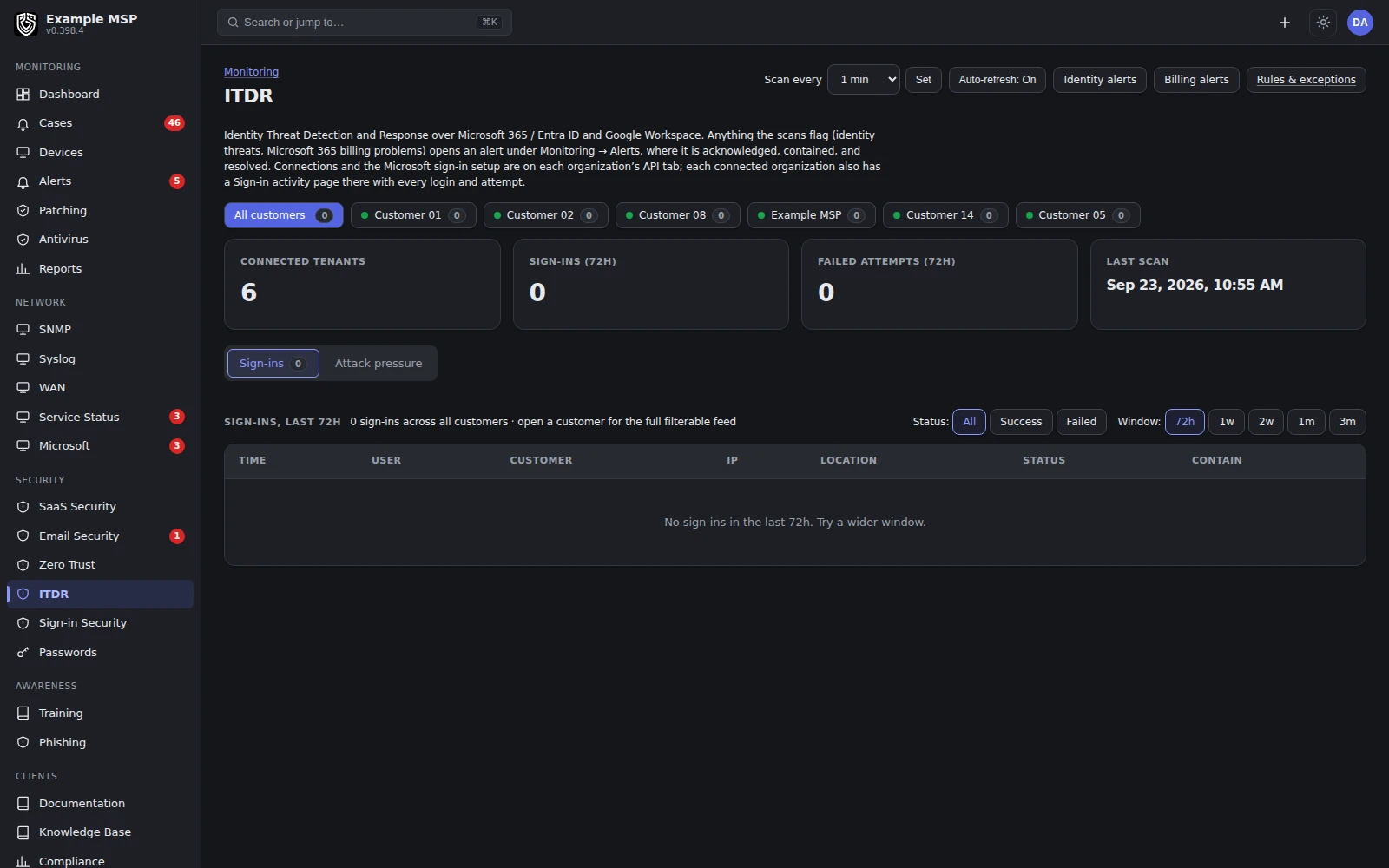
Connected customer tenants in one view, with sign-ins, failed attempts, the last scan and how often it runs. Product capture with fictional customer names.
Detection
What it looks for.
01
Geography that does not fit
Fence a Microsoft 365 customer to the countries and states they work from, with exceptions and a travel calendar for the people who really do move.
02
Anonymized sign-ins
Flag sign-ins from VPN, hosting, proxy and Tor addresses, and name the network behind them, on top of your own address catalog.
03
Suspicious mail rules
Inbox rules that forward or redirect mail to a domain outside the tenant, a classic sign of a mailbox takeover.
04
Privilege and consent
Administrator role changes, applications granted access, and consent policies that let any user approve them.
05
Coverage gaps
Accounts without multi-factor authentication, security defaults switched off, and legacy authentication left open.
06
Forgotten accounts
Enabled but unlicensed accounts created more than 90 days ago, the kind nobody notices until they are misused.
How it works
From a signal to a contained account.
Read access comes first. Write access is added only where you want the platform to act.
01
1. Connect the tenant
For Microsoft 365, the customer's administrator approves one Revolutionary RMM application for their tenant. For Google Workspace, you set up a service account with domain-wide delegation that acts as a super administrator.
02
2. Scan on your schedule
A deep scan runs every hour, and a fast watch runs as often as every minute. You set the cadence per workspace.
03
3. Raise the finding
Anything the scans flag opens an alert under Monitoring for that customer, where it is acknowledged, contained and resolved.
04
4. Respond by hand or by rule
Block the sign-in or revoke sessions in Microsoft 365, or suspend and sign out in Google Workspace. Automatic response runs only for the rules you turn on.
What it needs
Permissions, licenses and field use, stated plainly.
Microsoft 365
One approved application
The customer's administrator approves the Revolutionary RMM application for their tenant. Blocking a sign-in needs the User.ReadWrite.All permission, and signing an account out everywhere needs User.RevokeSessions.All.
Google Workspace
Service account
A service account with domain-wide delegation, acting as a super administrator, with the delegated scopes for the response actions you want.
Licensing
Entra ID P1 or not
Rich sign-in logs from Microsoft need Entra ID P1 on the customer tenant. Without it, the sign-in feed falls back to the unified audit log, and the audit, consent and multi-factor checks work on any license.
Network labels
Needs a MaxMind key
Naming the network operator and flagging VPN, proxy, Tor and hosting addresses needs a MaxMind GeoIP2 Insights key on your workspace.
Portal
What customers see
Customer administrators get a read-only identity view in the client portal, with the sign-in feed and connection status. You choose which portal tabs each role sees.
Field use
Where it runs today
Microsoft 365 is in use with our first design partner. Google Workspace support is built and available, with limited field use so far.
Limits
What it does not do yet.
Limits
- Geo-fencing works for Microsoft 365 only. Google Workspace sign-in events do not carry a country.
- Network operator, VPN, proxy, Tor and hosting labels need a paid MaxMind GeoIP2 Insights key.
- Google Workspace has seen limited field use compared with Microsoft 365.
- Nothing responds automatically until you turn on a response rule. A response cannot run if the tenant has not granted the permission it needs.
Not in the product today: verified offboarding across accounts and devices.
For Microsoft 365 and Google Workspace connections and their requirements, see the integrations page →
Questions
Good to know.
Yes, and that is deliberate. Each customer's administrator approves the Revolutionary RMM application for their own tenant, so they can see exactly what you are allowed to read and change in their environment.
The sign-in feed uses the unified audit log instead. Multi-factor coverage, administrator review, consent policy and mail rule checks are unaffected.
Check that the tenant has granted the permission for the action you want, pick the rules that may act, and decide how your team will check the result. Until a response rule is on, findings raise alerts and nothing in the tenant changes unless a technician acts.
A fast watch can run as often as every minute, and a deeper scan runs every hour. The cadence is set per workspace.
Their administrators can. The client portal has a read-only identity view with the sign-in feed and connection status, and you control which portal tabs each role sees.
Keep exploring
Limits, checked daily
Not in the product today.
Each line below is a gap recorded against this capability in the product's own feature record. A line leaves this page by itself on the next daily run once that record says the gap is closed, so the list cannot fall behind what we ship. The rest of this page is written by hand.
- Local administrator passwords are rotated and stored for you, and there is no request and approval step that grants a person elevated rights for a set time.
- Identity findings are reported one at a time, so there is no score per user that gathers them into one view.
Next step
Walk through a sign-in you did not expect.
Half an hour on a call. We will show how a finding is raised, what evidence it carries, and which responses are open to you.
