

For managed service providers
RMM and PSA for managed service providers
Monitoring, patching, remote support, tickets, documentation and billing in one workspace, where each customer keeps its own policies, portal and invoices. Bring one real workflow to a demo call and judge the product on the result.
Inside Revolutionary RMMDashboard
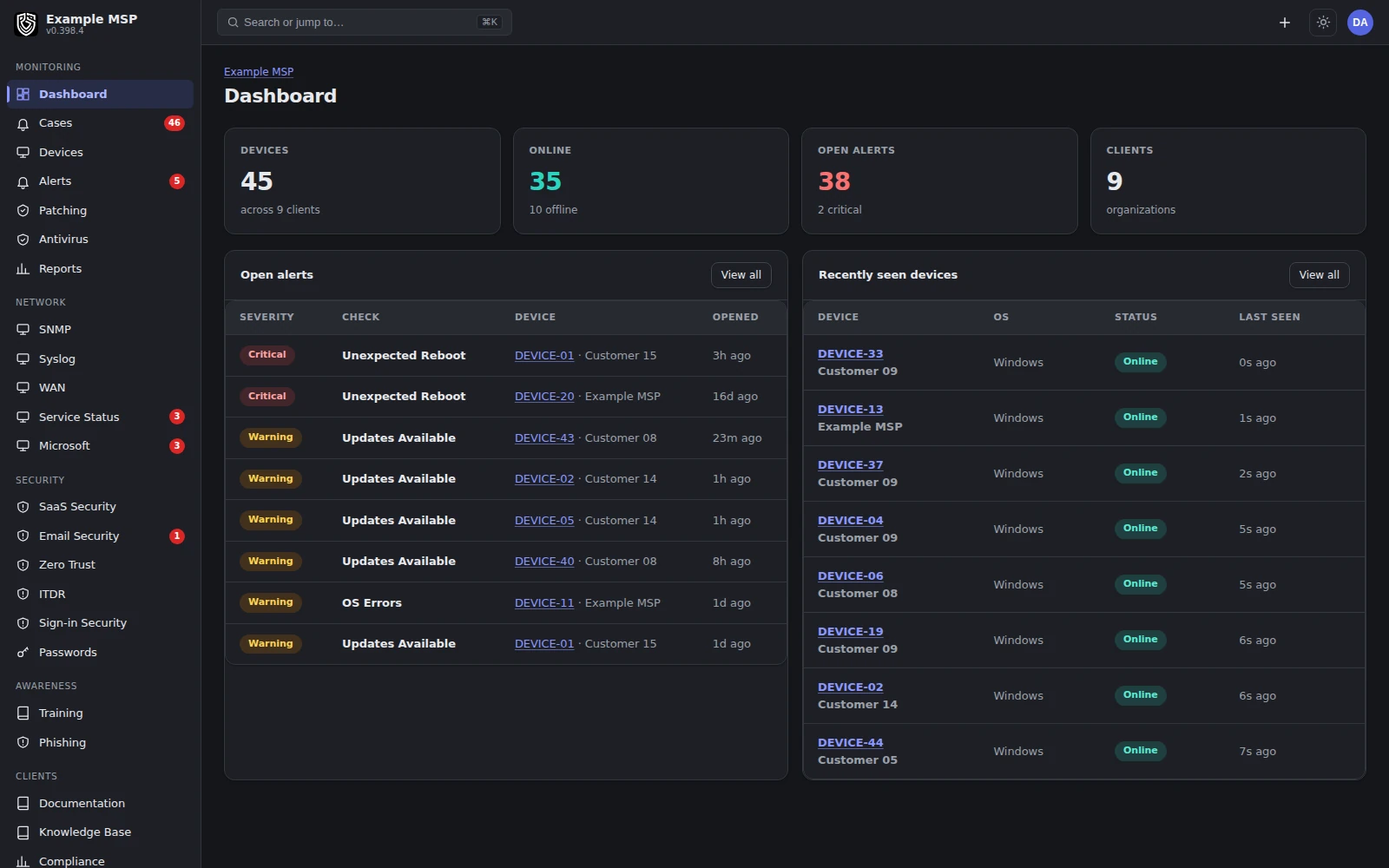
The workspace dashboard: fleet health, open work and what changed, across every customer. Product capture with fictional customer names.
Day to day
Where Revolutionary RMM helps an MSP.
The routine work that usually spans several tools, kept on one record.
01 / ALERTS TO TICKETS
An alert becomes owned work
Turn any alert into a ticket in one click, or let an alert source open one on its own. When the condition clears, the alert and its ticket resolve with it.
02 / TIME TO INVOICE
Logged time turns into a bill
A per-ticket timer, manual entries and remote-session minutes land on the ticket. Logged time is billed when the ticket is resolved, and invoices are pushed to your own payment processor.
03 / PER-CUSTOMER POLICY
Each customer gets its own rules
Policies attach to a customer and narrow by location, device group or a single device. Patch rules and exclusions are set per customer too.
04 / CLIENT PORTAL
Customers see their own work
A branded portal where customers raise and follow tickets, browse their assets and read the documentation you allow. Tabs follow a role matrix for each customer organization.
Inside Revolutionary RMMService desk
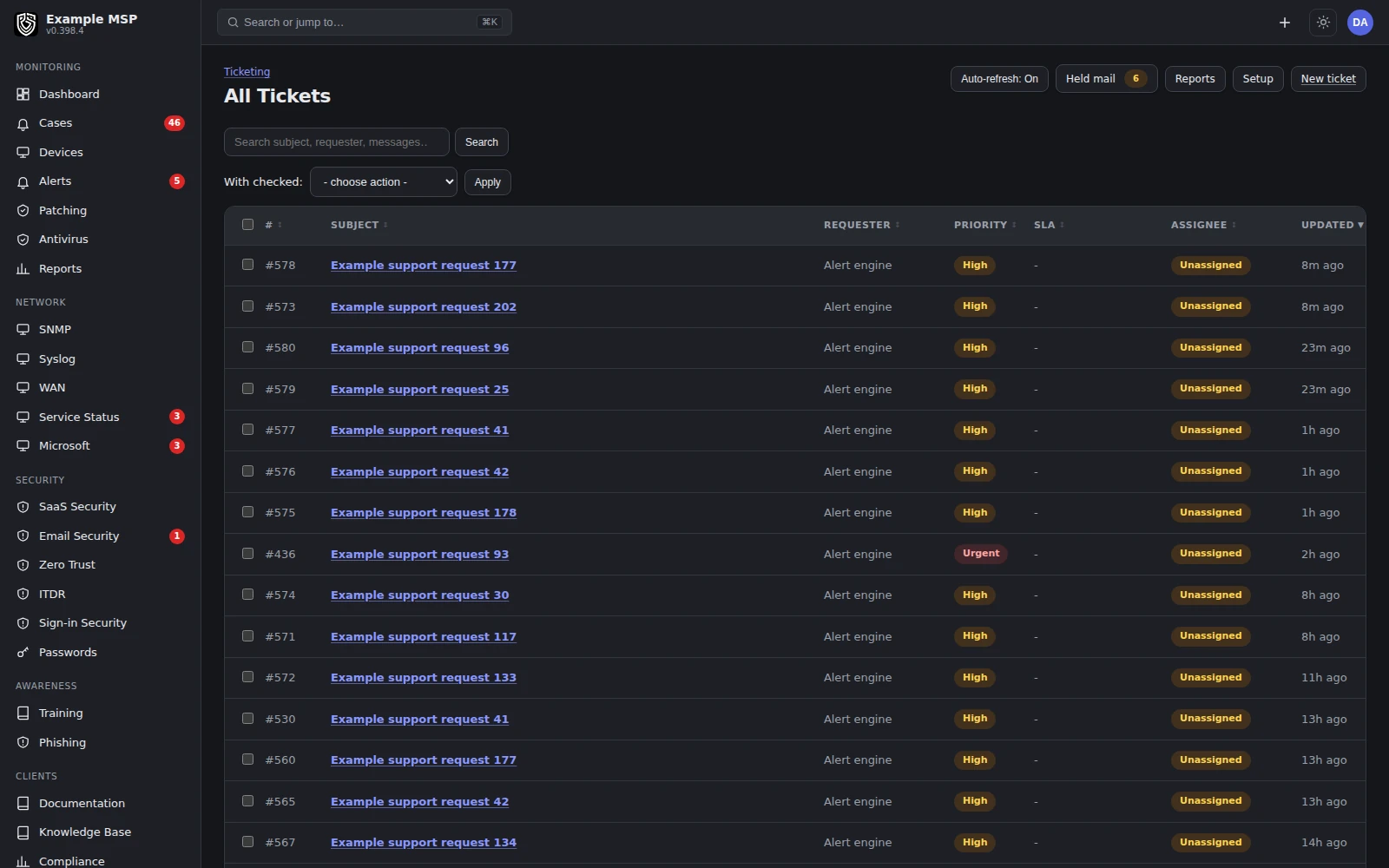
The board, with tickets grouped by the state they are in. Product capture with fictional customer names.
One workflow, start to finish
A server running out of disk.
The kind of example worth bringing to a demo call. Here is how it runs today.
01
1. Signal
A low-disk alert fires at that customer's own threshold, not one global number.
02
2. Context
The alert opens with the device and its customer. One click reaches the device's history, recent commands and open tickets.
03
3. Workflow
Run a disk-cleanup script through the signed command channel, or open a remote session. Session minutes are logged to the ticket they belong to.
04
4. Accountability
The case shows its owner and what ran. It closes when the condition clears, or when someone records a close by hand, and the case says which one happened.
Inside Revolutionary RMMAlert detail
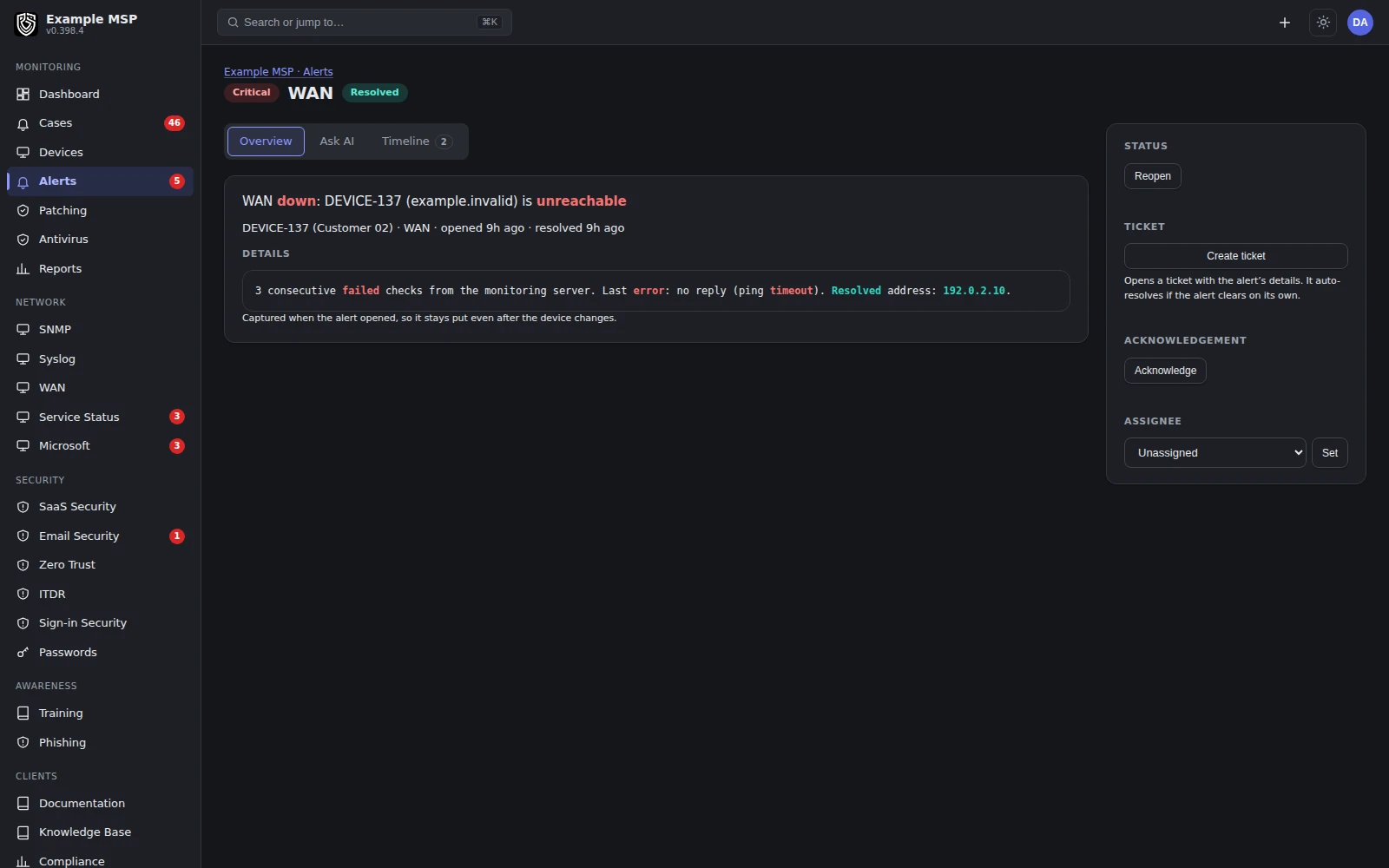
One alert with the device, its customer and the next step in the same view. Product capture with fictional customer names.
A script that exits zero is not proof the disk recovered. Revolutionary RMM waits for the monitored condition to clear.
Capabilities map
Twelve capabilities, one workspace.
Use these pages to prepare questions for the call. Each has its own Limits box.
MONITOR AND MAINTAIN
Monitoring and alerts
Per-customer thresholds and alerts that resolve when the condition clears.
MONITOR AND MAINTAIN
Patch management
Deploy, exclude and auto-deploy operating-system updates per customer.
MONITOR AND MAINTAIN
Network monitoring
SNMP v2c and v3 and syslog through a site relay, with no agent on the gear.
MONITOR AND MAINTAIN
Automation
A Windows script library, your own scripts, schedules and signed commands.
SECURE AND RESPOND
Identity security
Microsoft 365 and Google Workspace sign-in signals with block, revoke and suspend.
SECURE AND RESPOND
Microsoft 365
Secure Score, posture findings, license waste and Intune actions per customer.
SECURE AND RESPOND
Endpoint protection
Antivirus state across customers, isolation and BitLocker key escrow.
SECURE AND RESPOND
Mobile devices
Apple enrollment and management. Android Enterprise needs your Google connection.
SUPPORT, DOCUMENT AND BILL
Remote control
A native controller for Windows, macOS and Linux, with file transfer both ways.
SUPPORT, DOCUMENT AND BILL
Service desk
Email, portal and text message tickets with the device already attached.
SUPPORT, DOCUMENT AND BILL
Documentation and assets
Runbooks, encrypted credentials with audited reveals, and one asset inventory.
SUPPORT, DOCUMENT AND BILL
Billing and reporting
Ticket time to invoices at your processor, quotes and activity reports.
What needs setup
What you connect before it works.
Most of the platform works once agents are installed. These pieces need something from you or your customer first.
AGENTS
Deploy the agent
A silent EXE or MSI for Group Policy, Intune or configuration manager, with a reusable enrollment token per customer organization. Windows 10 and 11 and Windows Server 2016 and later; macOS on Intel and Apple silicon; Linux with glibc 2.31 and later.
NETWORK
A site relay for SNMP and syslog
Network devices are polled through a relay on a machine you already manage. No agent goes on the switch, printer or firewall.
MICROSOFT 365
Customer approval per tenant
The customer's administrator approves one Revolutionary RMM application for their tenant.
Workspace and Android
Google Workspace identity needs a service account with domain-wide delegation. Android Enterprise needs your workspace's own Google connection.
PROVIDERS
Services you choose
Text message tickets need an SMS provider (voip.ms, Twilio or Telnyx). Invoicing needs your payment processor. AI features run on your workspace's own AI key.
PRICING
Per managed endpoint
Priced per managed endpoint with no technician seats. Network monitoring is billed by relay beyond an included allowance.
Evaluate the work
Bring three things to the call.
A focused evaluation starts with your environment and ends with a scorecard.
01
Your environment
Approximate endpoint and customer counts, operating systems, and the integrations you rely on.
02
One real workflow
An alert investigation, patching task or support request that loses context or takes too many steps.
03
Your success criteria
The evidence you need: ownership, audit history, technician effort and a clear outcome.
01
Define the task
Agree on the environment, the people, the scope and the safeguards.
02
Record the baseline
Capture the current steps, missing context and time spent.
03
Inspect the evidence
Review the workflow in the product, including failures, ownership and the observed result.
04
Decide together
Review fit, limits, commercial scope and next steps.
Any installation or live pilot follows a written scope agreed in advance. The first conversation is about fit.
Fit
Honest about who it is for.
Not for you yet if your procurement process needs a SOC 2 report, an independent penetration test or a contractual service level agreement from your RMM vendor today, or you need a staffed vendor operations center with a contractual response time. Support is 24/7 and you reach the founding team at any hour, but that is not a shift rota and we will not call it one. We do not claim those yet, and we will say so on the first call.
What it does not do yet
- Patch detection covers operating-system updates. Third-party applications are deployed as installers you upload; there is no application patch catalog yet.
- There is no network discovery scan yet. Devices appear when an agent is installed, when SNMP polling is set up, or when you add them by hand.
- Scripts are not versioned and there are no approval rings for automation yet.
- Windows Server 2012 R2 and older cannot run the agent. Monitor them over SNMP instead.
- The service desk covers tickets, time, service-level targets and a portal. Check contracts, agreements and procurement against your own process before retiring a separate PSA.
Not in the product today: verified third-party application updates, versioned and reviewed automation, and network discovery.
Questions
Good to know.
Yes, to talk with us and see the product. Any parallel use, installation or data exchange during a pilot is checked against your environment and written into the agreed scope first.
Each MSP workspace has its own PostgreSQL database and role. Inside your workspace, what a technician sees follows their role and assigned customers, and portal access is set per customer organization.
Many teams will not. Tickets, time, service-level targets, a client portal, quotes and invoicing are built in. Check contracts, agreements and procurement against your own process.
Windows 10 and 11, Windows Server 2016 and later, macOS on Intel and Apple silicon, and Linux with glibc 2.31 and later. Network devices are monitored over SNMP without an agent.
Per managed endpoint, with no technician seats. Your written quote states the rate, how each device type is counted, any minimum and the term.
Yes. Design partners bring a real workflow and help decide what we improve next. A conversation carries no commitment, and any pilot is scoped separately.
Keep exploring
Next step
Bring a workflow worth improving.
Half an hour on a call. Bring the task that takes your technicians too many steps, and we will show how Revolutionary RMM handles it, limits included.
