

Service desk
Service desk and client portal (built-in PSA)
For MSP teams who want tickets, time and customer records in the same product as their monitoring. Each ticket opens with the device, the customer and the history already attached.
Inside Revolutionary RMMService desk
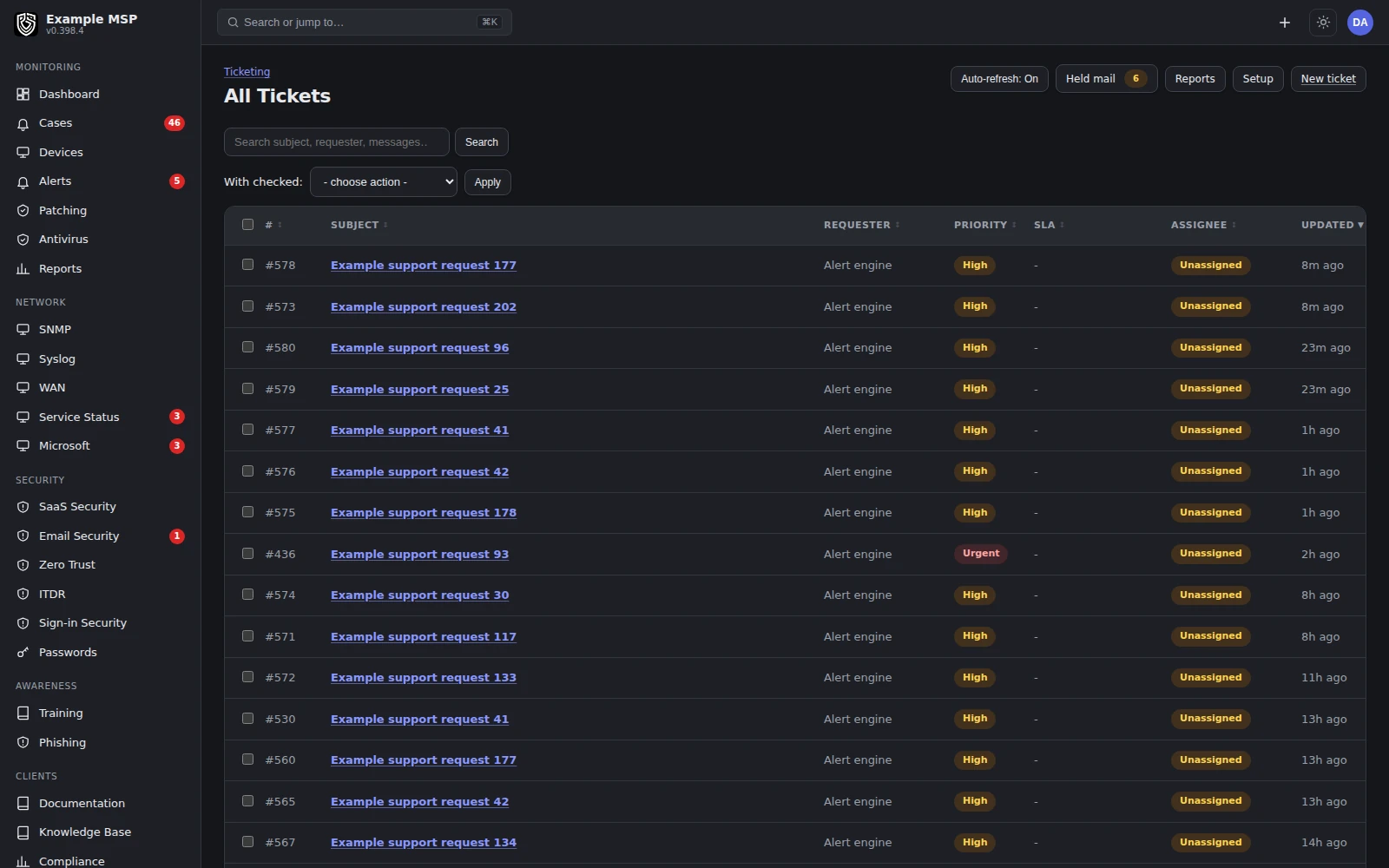
The board, with tickets grouped by the state they are in. Product capture with fictional customer names.
What it does
Everything a ticket needs to be useful.
01 / EMAIL
Email that threads on the conversation.
A support mailbox is polled. Replies match on the mail conversation, not only a subject tag, so a customer who deletes the ticket number does not open a duplicate. Held messages wait on a pending board.
02 / TEXT
Text message tickets.
Connect an SMS provider (voip.ms, Twilio or Telnyx) and a business number. Inbound texts open or continue tickets, and your replies go back as texts.
03 / DEVICE
The device is attached.
Link a ticket to a device and its metrics, commands and patch history are one click away while you work.
04 / TIME
Time on the ticket.
A per-ticket timer, manual entries, and remote sessions that add their measured minutes to the ticket they belong to.
05 / IMAGES
Screenshots inline.
Paste or drag an image into a reply or a note. It shows in the ticket timeline and in the outbound email.
06 / AI
AI when you ask for it.
A technician can ask for a read on the thread, with the device context included. It runs on request, for staff only, on your workspace's own AI key. Every question and answer is logged.
How it works
From the first message to the invoice.
01
Intake
An email, a portal request, a text message or a monitoring alert opens the ticket.
02
Context
The ticket links to its device and customer. Related alerts are grouped into a case, with the tickets under it.
03
Work
The timer runs, remote sessions log their minutes, and service-level targets escalate when they slip.
04
Resolve and bill
Logged time is billed when the ticket is resolved, and a satisfaction survey goes out with the resolution.
Inside Revolutionary RMM · Cases
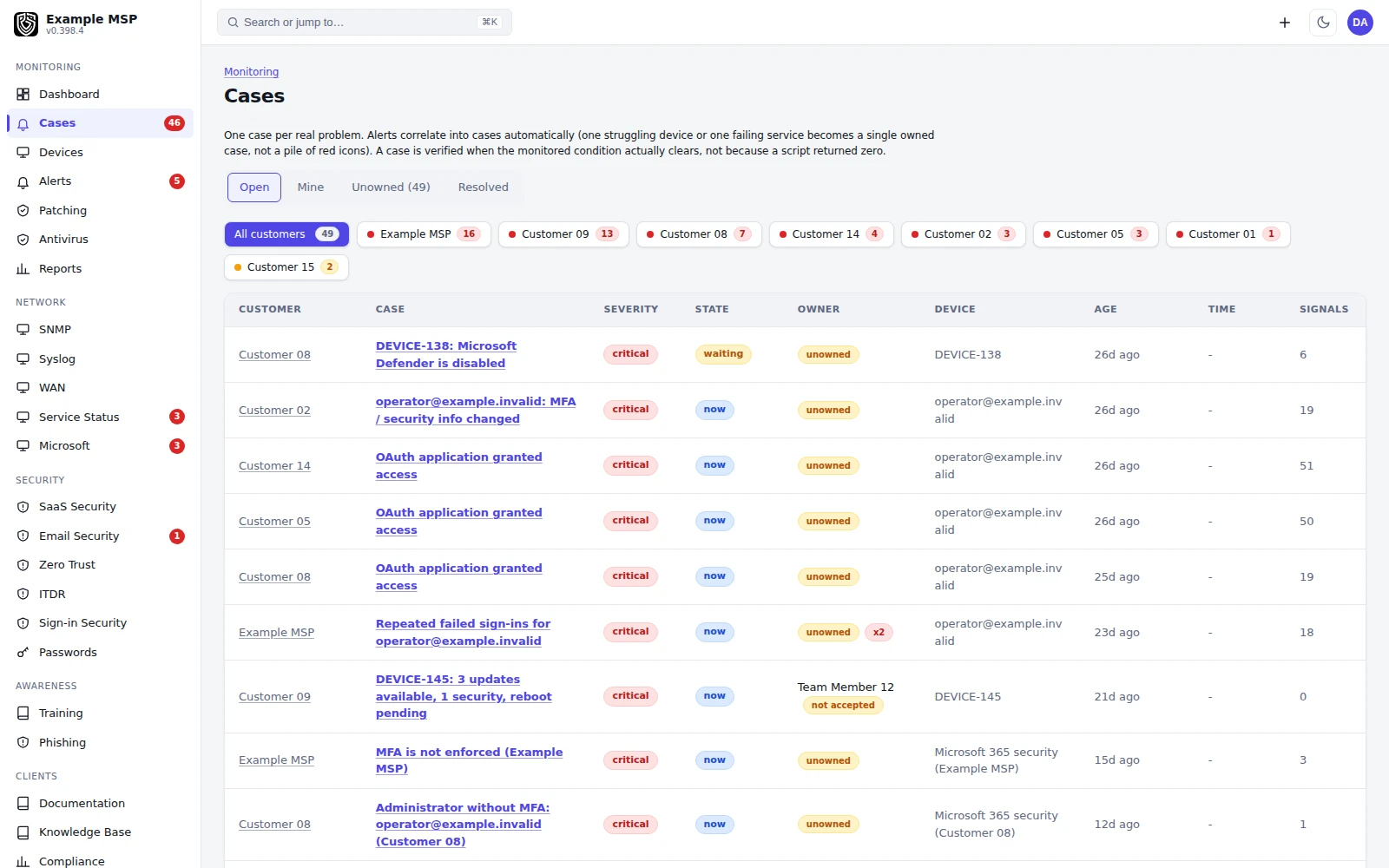
Cases group related alerts and the service work under them. Product capture with fictional customer names.
Client portal
Somewhere useful to send your customers.
Customers sign in to a portal with your logo, colors and business details. Which tabs each portal role sees is set per customer organization.
TICKETS
Raise and follow tickets.
With attachments and inline images, on the same record your technicians work from.
DEVICES
See their own estate.
Their computers, mobile devices and network equipment, plus an asset inventory they can browse and export.
DOCUMENTATION
Read what they are allowed to.
The documentation their administrators are allowed to see, and a private personal password vault.
SECURITY
Check their posture.
Identity security and patch status for their own devices and accounts.
BILLING
See the work and the bill.
Compliance reporting and their running invoice, in the same place as their tickets.
ROLES
You decide what shows.
Portal tabs follow a role matrix for each customer organization, so a staff member and an administrator see different things.
Around the ticket
The parts that make a desk a desk.
SERVICE LEVELS
Targets with escalation.
Response and resolution targets, with escalation when they slip.
MERGE
One ticket, not three.
Combines duplicates and carries attachments, notes, watchers and history forward.
REQUEST FORMS
Structured intake.
Forms whose answers attach to the ticket, so the first reply is not a list of questions.
KNOWLEDGE BASE
Articles for both sides.
Articles for technicians and articles for customers.
SURVEYS
Satisfaction on resolution.
Sent when a ticket is resolved, with the score recorded against that ticket.
NOTIFICATIONS
Rules and templates.
Choose who is emailed on which event, and edit every outbound message with a live preview.
Limits
What it does not do yet.
Limits
- Contract, service agreement and procurement workflows are limited compared with a dedicated PSA.
- There is no self-serve ticket export yet.
- Text message tickets need your own SMS provider and business number, and have seen limited field use so far.
- AI answers run only when a technician asks, and need your workspace's own AI key.
- Not for you yet if your billing depends on contract management or procurement inside your PSA. Keep that tool for now and bring us the rest of the ticket workflow.
Not in the product today: honest outcome metrics (time to owner, time to verified resolution, technician minutes per case), and customer-facing outcome reports.
Questions
Good to know.
Many teams will not. Tickets, time, customers, documentation, assets and invoicing are in the same product, so work is not re-entered on its way to a bill. Check contracts, agreements and procurement against your own process first, because those areas are limited today.
Yes. A support mailbox is polled, replies thread onto the existing ticket by mail conversation, and held messages queue on a pending board instead of disappearing.
Yes, once you connect voip.ms, Twilio or Telnyx and a business number. Inbound texts open or continue tickets and replies are sent as texts. This path has seen limited field use so far.
No. A technician asks for it on a ticket, it answers with the device context in hand, and the question and answer are logged. It uses your workspace's own AI key and is not shown to customers.
Logged ticket time is the source of truth. Work is billed when the ticket is resolved, and remote sessions add their measured minutes to the ticket they belong to, so they are not billed twice.
Yes. It carries your logo, colors and business details, and so do the documents it produces.
Keep exploring
Limits, checked daily
Not in the product today.
Each line below is a gap recorded against this capability in the product's own feature record. A line leaves this page by itself on the next daily run once that record says the gap is closed, so the list cannot fall behind what we ship. The rest of this page is written by hand.
- Parts and products cannot be added to a ticket and carried through to the invoice; recorded time is what reaches billing.
- There is no add-in for the mail client, so a message becomes a ticket through the ticket mailbox rather than from inside the inbox.
- Time is recorded on tickets and cases and reaches billing; a technician timesheet, with utilization to review and approve, is not built yet.
Next step
Bring us a ticket that took too many steps.
Half an hour on a call. We will walk through it in the product, from the first message to the invoice.
