

Endpoint protection
Endpoint protection and response
When something goes wrong, contain it and keep your way in. See antivirus state across every customer, isolate a device from the network while the agent stays connected, turn on encryption you can prove, and deal with a laptop that is not coming back.
Inside Revolutionary RMMAntivirus
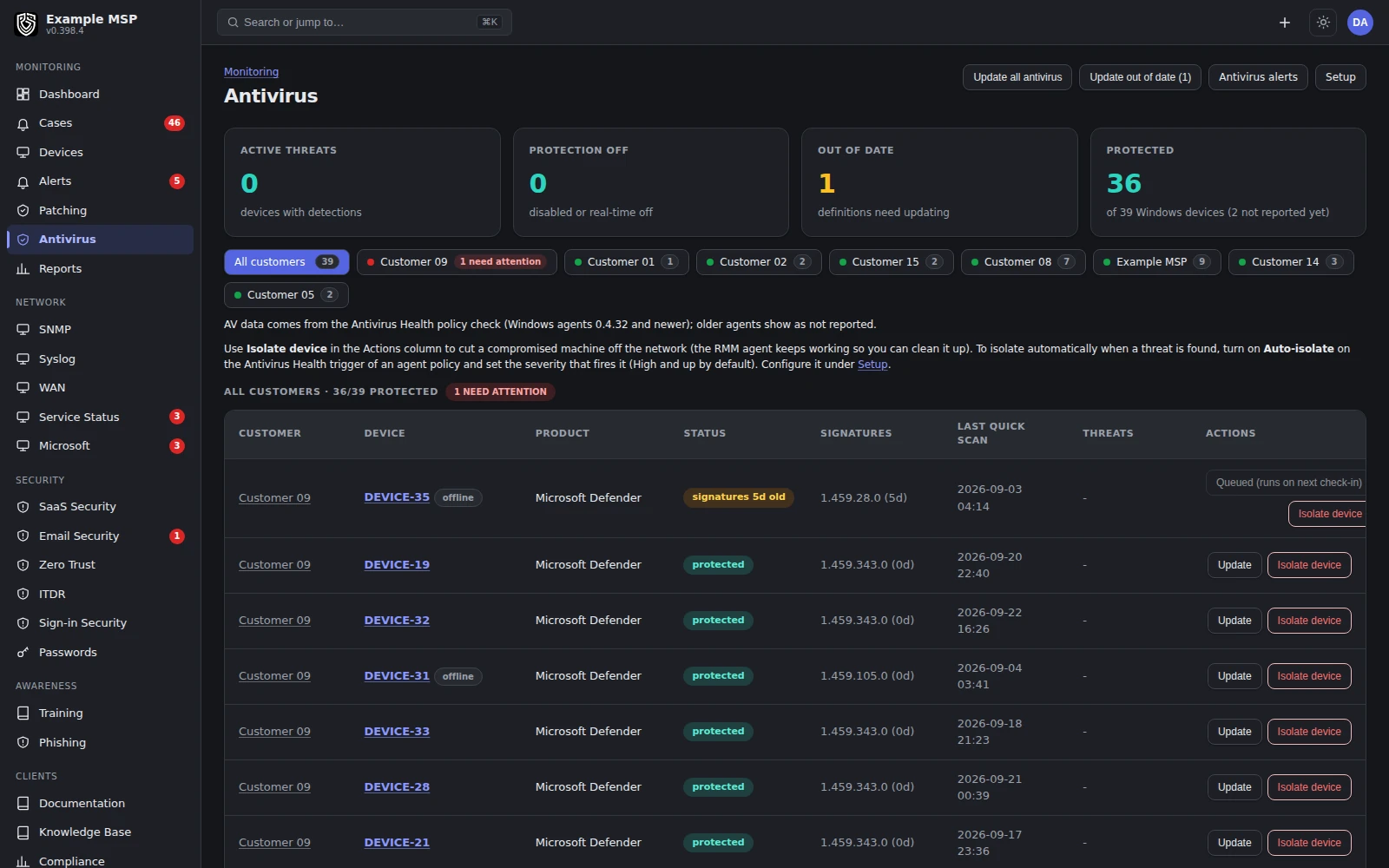
Antivirus state across every customer, with Update and Isolate device on each row. Product capture with fictional customer names.
What it does
Monitoring and response, stated plainly.
Revolutionary RMM watches the antivirus already on the machine and drives it. It is not a detection engine of its own.
01
Antivirus state
Engine, definition age and active threats per device. Microsoft Defender and third-party engines are both inventoried, and the active engine is the primary reading.
02
Update only what is stale
Push a definition update to only the machines that are out of date, across one customer or all of them.
03
Isolate, keep the agent
Host firewall rules drop everything except the management agent, DNS and DHCP, so the machine is quarantined and you can still work on it.
04
BitLocker you can prove
Turn encryption on from the device page, watch the progress, and have the recovery key escrowed to the workspace automatically.
05
Local administrator rotation
Managed local administrator passwords rotate on a schedule, with an audited reveal for the technician who needs one.
06
Lost and stolen
Lock the disk, reset the machine, or erase an enrolled Mac. Each action waits for an offline device and needs the hostname typed to confirm.
How it works
From a detection to a contained device.
01
1. The agent reads the protection
On Windows devices, the agent reports the engine, whether real-time protection is on, the definition age and any active threat.
02
2. A threat raises an alert
An active threat or out-of-date definitions are conditions you can alert on, per customer policy.
03
3. Isolation, by hand or by policy
Isolate from the device row, or let an antivirus policy isolate on its own when a threat at or above the severity you choose is detected.
04
4. Release restores the network
The previous firewall state is exported before isolation and restored on release, instead of being rebuilt from a guess.
Lost and stolen
Three answers, in order of regret.
All three wait for an offline device and run on its next check-in, and all three need the hostname typed to confirm.
Reversible
Crypto lockout
Force BitLocker recovery on every protected volume. The disk is unreadable at the next boot, and the machine comes back with the recovery key you already hold.
Permanent
Factory reset
Reset the machine to a clean state, with a fallback path for Windows builds that no longer ship the reset tool.
Apple
Remote erase
An enrolled Mac is matched by serial number and erased through Apple's push notification service, using the mobile device management path instead of the agent.
Workspace
Sign-in protection
Lockouts, address blocking, scan detection and an allow list that always wins, protecting your Revolutionary RMM workspace itself.
Limits
What it does not do yet.
Limits
- This is antivirus monitoring and response, not a proprietary detection engine. It drives the protection the endpoint already has and reports its real state.
- Antivirus state is read on Windows devices.
- Starting a scan is done with a script template from the automation library, not a dedicated button.
- Nothing works on a device that never comes back online. A machine wiped and reinstalled before it reaches the internet again is beyond any agent-based tool, ours included.
Not in the product today: policy preview and rollback with per-device rule visibility.
For supported EDR connections, including which vendors support detection sync and isolation, see the integrations page →
Questions
Good to know.
No. Revolutionary RMM monitors and drives the antivirus already on the machine, Microsoft Defender or a third-party engine. It does not include a detection engine of its own.
No. Isolation keeps the management agent, DNS and DHCP working, so you can still reach and repair the machine. Releasing it restores the firewall state it had before.
Yes. An antivirus policy can isolate a device on its own when a threat at or above the severity you choose is detected.
Crypto lockout, factory reset and remote erase are queued and run on the device's next check-in. A device that never comes back online cannot receive them.
When you turn encryption on from the device page, the recovery key is escrowed to your workspace automatically.
Keep exploring
Limits, checked daily
Not in the product today.
Each line below is a gap recorded against this capability in the product's own feature record. A line leaves this page by itself on the next daily run once that record says the gap is closed, so the list cannot fall behind what we ship. The rest of this page is written by hand.
- Vulnerabilities are listed per device, so there is no fleet-wide list of findings that sends the fix from the same screen.
- The per-device vulnerability view covers protection state, disk encryption and account findings; matching the software a device has installed against published vulnerability records is not built yet.
- Hardening is checked and reported against recognized control sets, and fixes are applied one item at a time rather than as a whole baseline in one run.
Next step
Isolate a device on the call.
Half an hour. We will isolate a test machine, show the agent still connected, and release it again.
