EDR connectors
Video guide: Locate EDR setup and mapped endpoint evidence
Recorded October 22, 2026 in the fictional Summit Managed IT staging workspace, App 0.432.1. The deployed demo can differ from the current product; use the written guide for current behavior. Connector setup orientation only; no vendor authentication, sync, detection or isolation/release.
Full narration captions are included in the video. Open video full screen · Download subtitles · Download transcript
Video transcript
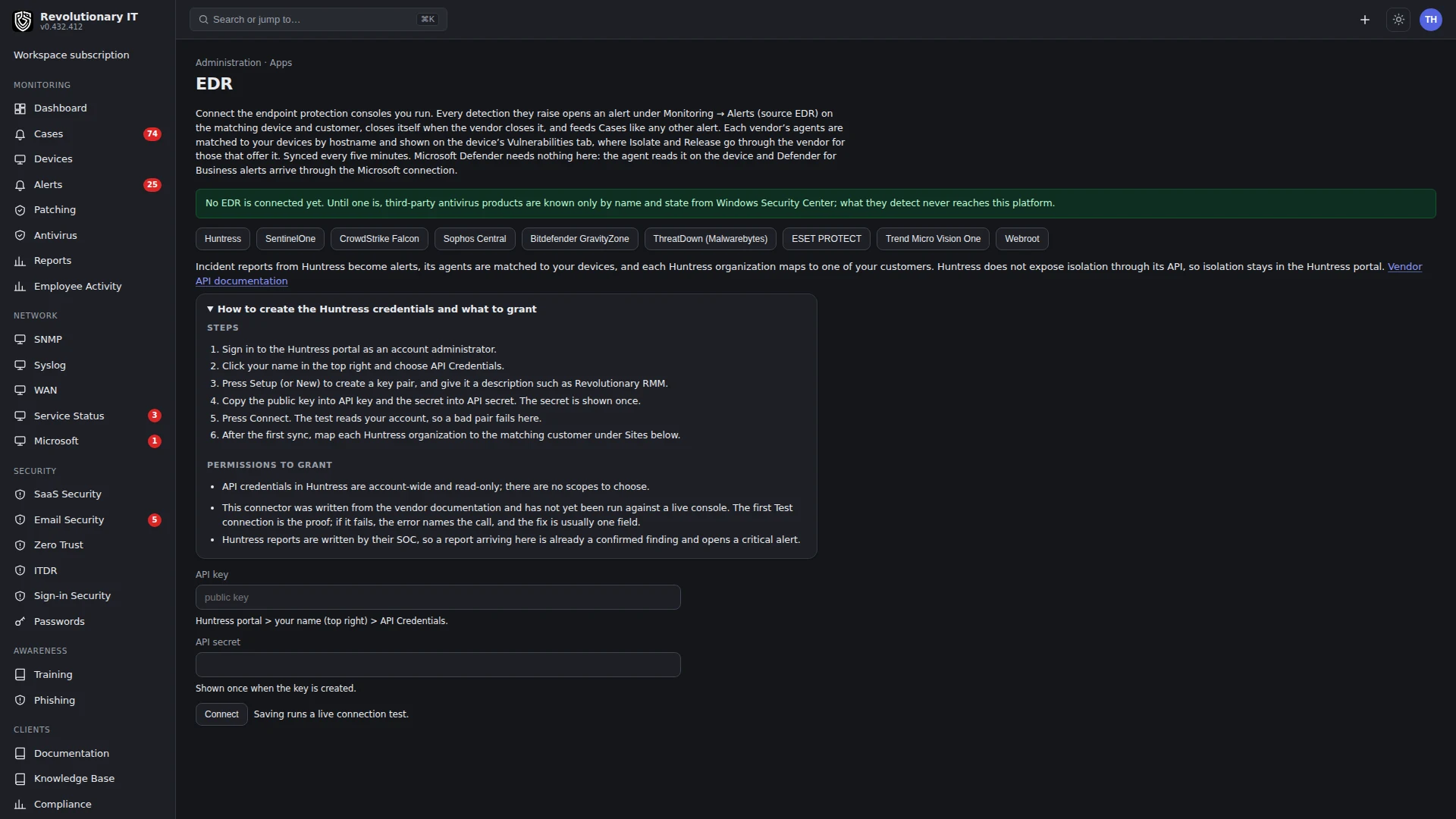
Open Administration, Apps, EDR. These connectors integrate an endpoint security product the customer already uses. Choose the vendor only after checking its current setup guide and required permissions. We do not type credentials or press Connect or Sync.
Open the device Vulnerabilities tab. This offline demo record has no mapped EDR evidence. After authorized setup, vendor records must map to the intended customer and device. Hostname differences and short-name collisions need investigation; a listed connector alone does not prove a correct match.
Read the adapter capability matrix in the written guide. Isolation and release support are vendor-specific and separate from RMM firewall isolation. Verify a recent successful sync and a customer-approved benign vendor test. A queued vendor response is not confirmed containment or release.
What it does
EDR connectors pull detections and agent health from the endpoint detection and response product the customer already runs and put them where the technicians work: an EDR alert on the matching RMM device, the device's Vulnerabilities tab, site-to-customer mapping, and, for capable adapters, request isolation or release through the vendor. Nine vendor adapters exist: Huntress, SentinelOne, CrowdStrike Falcon, Sophos Central, Bitdefender GravityZone, ThreatDown (Malwarebytes), ESET PROTECT, Trend Micro Vision One and Webroot.
How it works
- One framework, one adapter per vendor: list sites or organizations, list agents and list detections since a time. Isolation/release is vendor-specific (matrix below). Credentials are stored encrypted per connector.
- The edr-sync timer runs every 5 minutes: it refreshes the vendor's agents, matches each to an RMM device by lowercased short hostname within the mapped customer, records health and isolation state, and opens or resolves EDR alerts from detections (Huntress incident reports, SentinelOne threats, Falcon detections and so on) with the vendor's severity mapped to WARNING or CRITICAL.
- Auto-isolate: an enabled connector with isolation support can request vendor isolation when a newly processed detection creates a new alert normalized to CRITICAL (vendor HIGH/CRITICAL). Enabling the toggle does not retrospectively contain every historical detection. There is no configurable per-connector severity-floor selector. A provider request is not proof of endpoint isolation.
- Setup guides for each vendor's API credentials are on the connector page.
Adapter capability matrix
All nine implement site, agent and detection reads. Each still needs a valid account, permitted API scopes, correct region/base URL and mapped site; a passing Test does not exercise every read or action.
Huntress
Not supported by this adapter
SentinelOne
Supported
CrowdStrike Falcon
Supported
Sophos Central
Supported
Bitdefender GravityZone
Supported
ThreatDown
Supported
ESET PROTECT
Not supported by this adapter
Trend Micro Vision One
Supported
Webroot
Not supported by this adapter
“Supported” describes the implemented API path, not acceptance on every subscription/device. The connector's setup panel lists the credential fields it uses. Grant read permissions for collection and add vendor action rights only when the customer authorizes containment. Inspect the actual provider error when a capability is refused.
Step by step
- Administration > Apps > EDR: pick the vendor and enter what it asks for (API key and secret for Huntress; console URL and API token for SentinelOne; client id, secret and cloud for CrowdStrike; client id and secret for Sophos; API key and base URL for Bitdefender; client id, secret and account id for ThreatDown; integration user, password, region and base URL for ESET; API key and region for Trend Micro; client id, secret, console user, password and GSM keycode for Webroot), then choose Connect.
- Then use Test connection and Sync now. The first sync lists the vendor's sites.
- Map each site to the customer organization it belongs to. Unmapped sites are ignored.
- Optional: review the adapter’s isolation support and customer authorization before enabling auto-isolate. It applies to the implemented CRITICAL normalized-alert condition, not a configurable floor.
Day to day
- Monitoring > Alerts filters by source EDR; each alert links to the vendor's console item and the RMM device.
- Device page > Vulnerabilities > EDR panel: the vendor agent's status, health, version, last seen, open threats, and Isolate or Release at the vendor where the adapter supports it (OWNER or ADMIN). These controls are distinct from the RMM agent firewall-isolation workflow.
Verification
- After the first sync, the device's Vulnerabilities tab shows the EDR agent with a recent last-seen.
- With an authorized benign vendor test, confirm the next successful sync produces the expected mapped alert. The configured five-minute job interval is not a completion deadline. Check vendor and native state for any separately authorized isolation test.
Troubleshooting
- Devices not matched: hostnames differ between the vendor and the RMM (a domain suffix or renamed machine); matching lowercases and removes the domain suffix before matching within the mapped customer. Inspect short-name collisions and site mapping rather than changing provider records blindly.
- No detections: check the last sync/error, provider permissions, site mapping and whether a matching event exists in the selected period. A missing detections scope is one possible cause.