Email security gateways
Video guide: Find email security setup and adapter limits
Recorded October 22, 2026 in the fictional Summit Managed IT staging workspace, App 0.432.1. The deployed demo can differ from the current product; use the written guide for current behavior. No gateway is connected in the demo; no customer detection view, provider sync, held-mail release or sender block is demonstrated.
Full narration captions are included in the video. Open video full screen · Download subtitles · Download transcript
Video transcript
Open Security, Email Security. No gateway is connected in this fictional workspace, so no customer detection view is available. The empty landing page is a setup prerequisite, not evidence that there were no threats. Collection permissions, mapping and sync results still need verification.
Open the written adapter capability matrix. Gateway messages stay with the vendor; the RMM collects supported metadata and counters. Held-mail and response support vary by adapter. Never release a message or block a sender just to test whether a connector works.
Use the written guide to check the adapter capability matrix, credential setup and customer-domain mapping. After an authorized benign provider test, confirm the successful sync, intended customer and expected detection. A connected badge does not establish every feed or response permission.
What it does
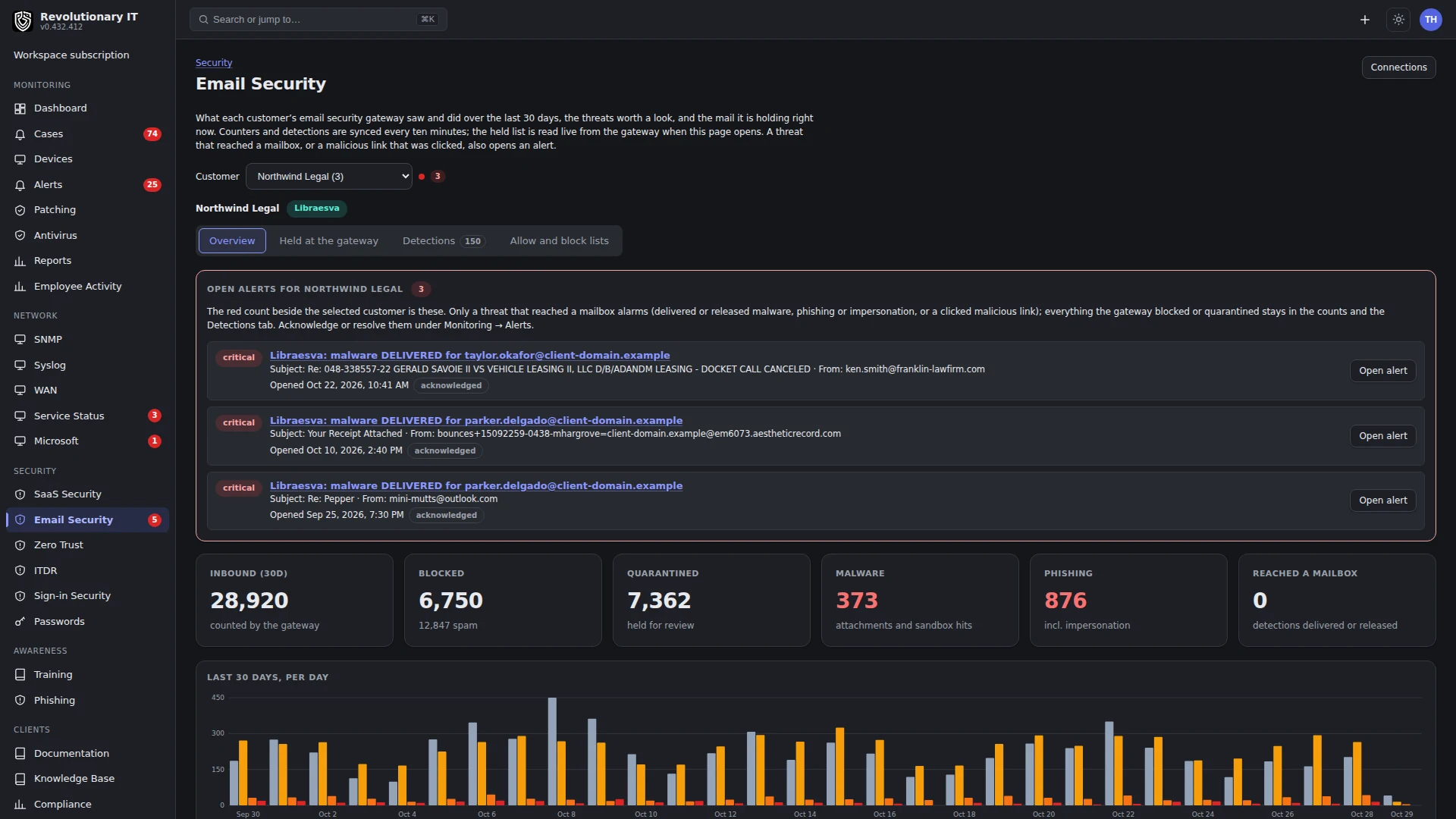
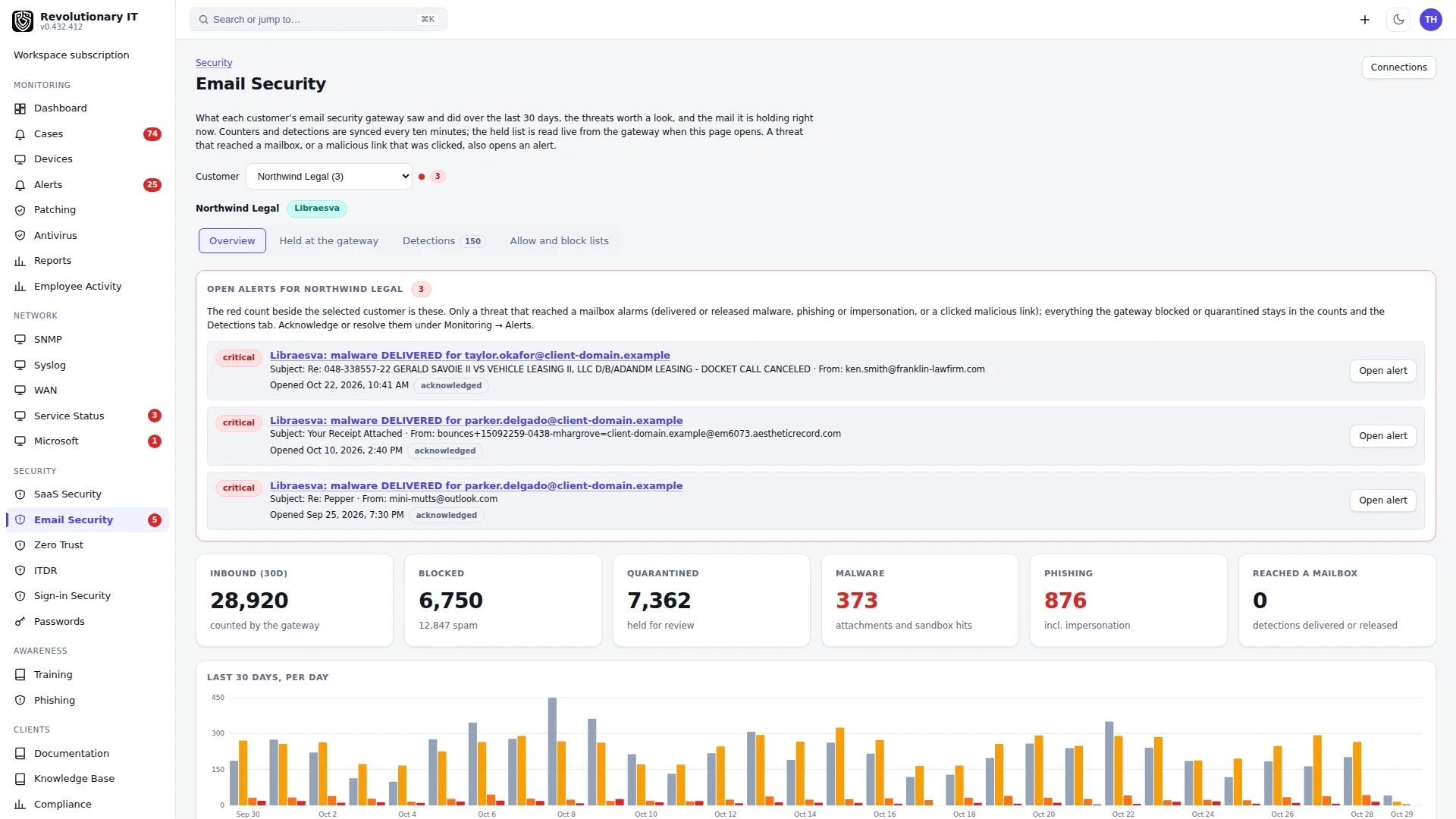
Email security connectors read the email security gateway (ESG) each customer already sits behind and put what it saw where the technicians work: per-customer counters and a 30-day chart on Security > Email Security, a detections list (malware, phishing, impersonation, malicious link clicks), cached held-mail metadata and provider-specific Release/Block sender controls, and source Email security alerts for eligible new delivered/released HIGH/CRITICAL detections, subject to mapping and rules. Nine vendor adapters exist: Libraesva, Mimecast, Proofpoint Essentials, Proofpoint TAP, Barracuda Email Gateway Defense, Check Point Harmony Email (Avanan), SpamTitan, IRONSCALES and Microsoft Defender for Office 365.
Not every customer needs the same gateway, and a customer with none simply shows nothing. Defender uses the existing authorized Microsoft 365 connection rather than a separate gateway credential. Its API permissions and tenant licensing still matter.
How it works
- One framework, one adapter per vendor: list the protected domains (or organizations or tenants), list detections since a time, daily counters per domain and optional held/release/block support (matrix below). Credentials are stored encrypted per connector.
- The esg-sync timer runs every 10 minutes. It refreshes the vendor's domain list, maps each domain to a customer (automatically when the domain is on the customer's Domains tab, by hand otherwise), stores new detections, upserts the daily counters, and purges detections older than the retention set on the connector.
- Alerts: new detections normalized as delivered/released and HIGH/CRITICAL can open an alert, subject to customer mapping and Alert Rules. Updating an existing detection does not run the same new-row alert path. Not every phish/click is classified at that severity; blocked/quarantined/unknown outcomes do not establish a delivered-threat alert. Blocked and quarantined mail stays on the dashboard. A connector whose sync fails raises one warning that clears on the next clean pass. All of it routes through Alert Rules (engine Email security).
- Storage: the gateway retains the messages; the adapter stores daily counters and detection metadata, not message bodies or attachments. Detections expire according to the connector retention (default 90 days). Held metadata is cached in process for 15 minutes and prewarmed by sync; Refresh rereads the provider. It is not a guaranteed live queue on every page load. Volume, metadata size, indexes and backups determine storage; there is no measured annual capacity guarantee.
Adapter capability matrix
Libraesva
Implemented
Implemented
Mimecast
Implemented
Implemented
Proofpoint Essentials
Implemented
Implemented
Barracuda Email Gateway Defense
Implemented
Implemented
SpamTitan
Implemented
Implemented
Check Point Harmony Email
Implemented
Not implemented
Proofpoint TAP
No held queue or release
Not implemented
Microsoft Defender for Office 365
No held queue or release
Not implemented
IRONSCALES
No held queue or release
Not implemented
All declare statistics collection; exact counters and detection coverage depend on their APIs, permission and license. “Not implemented” concerns this RMM adapter, not everything the vendor offers in its own console. An empty held list for an unsupported adapter is not evidence that no messages are quarantined. Use the vendor console for unsupported response actions. Review sender/domain, recipient and provider outcome before release/block; these operations affect real mail.
Step by step
- Administration > Apps > Email Security: pick the vendor tab and follow the numbered guide on it to create the credential (a dedicated admin user for Libraesva; an API 2.0 application for Mimecast; region, partner domain and an API user for Proofpoint Essentials; a SIEM credential for Proofpoint TAP; client id, secret and account id for Barracuda; an Infinity Portal API key for Harmony Email; an API token for SpamTitan; a partner API key for IRONSCALES; the existing Microsoft 365 connection for Defender).
- Press Connect. Test exercises a bounded credential/API probe, not every permission, tenant license, feed or response action. For Libraesva it also lists the API resources the console exposes, so a console whose API differs from the one the adapter was written against shows it there.
- Press Sync now. The domains table fills in; anything already on a customer's Domains tab is mapped automatically (marked auto). Map the rest by hand.
- Optional: change the retention (7 to 365 days) per vendor.
Day to day
- Security > Email Security: pick a customer (red dot = open email security alerts). KPIs for the last 30 days, the per-day chart, cached held-mail metadata (Release/Block sender only for capable adapters), and the detections list filtered by kind.
- Monitoring > Alerts filters by source Email security.
Verification
- After the first sync, the vendor tab shows the domain count and the customer's Email Security page shows counters for the current day.
- Use only a customer-approved benign provider test. Confirm ingestion on a successful sync, the mapped customer and the alert condition. The ten-minute schedule is not a delivery deadline; do not send test malware or release a held message merely to test connectivity.
Troubleshooting
- Counters but no customer: the vendor's domain is not on any customer's Domains tab and not mapped by hand; map it on the vendor tab.
- Libraesva "not in the API index": inspect the console version, exposed API index and user permissions; older/different API versions or insufficient administrator access are possible causes.
- Defender tenant refuses: the Microsoft 365 app registration lacks SecurityAlert.Read.All for detections or Reports.Read.All for volume or the customer was connected before that permission was added; add it and reconnect that customer.
- Proofpoint TAP reaches back seven days at most: the first sync cannot backfill further.