Security Awareness Training and phishing simulations
Video guide: Find awareness courses and phishing workflows
Recorded October 22, 2026 in the fictional Summit Managed IT staging workspace, App 0.432.1. The deployed demo can differ from the current product; use the written guide for current behavior. No learner assignment, course completion, phishing campaign or email delivery.
Full narration captions are included in the video. Open video full screen · Download subtitles · Download transcript
Video transcript
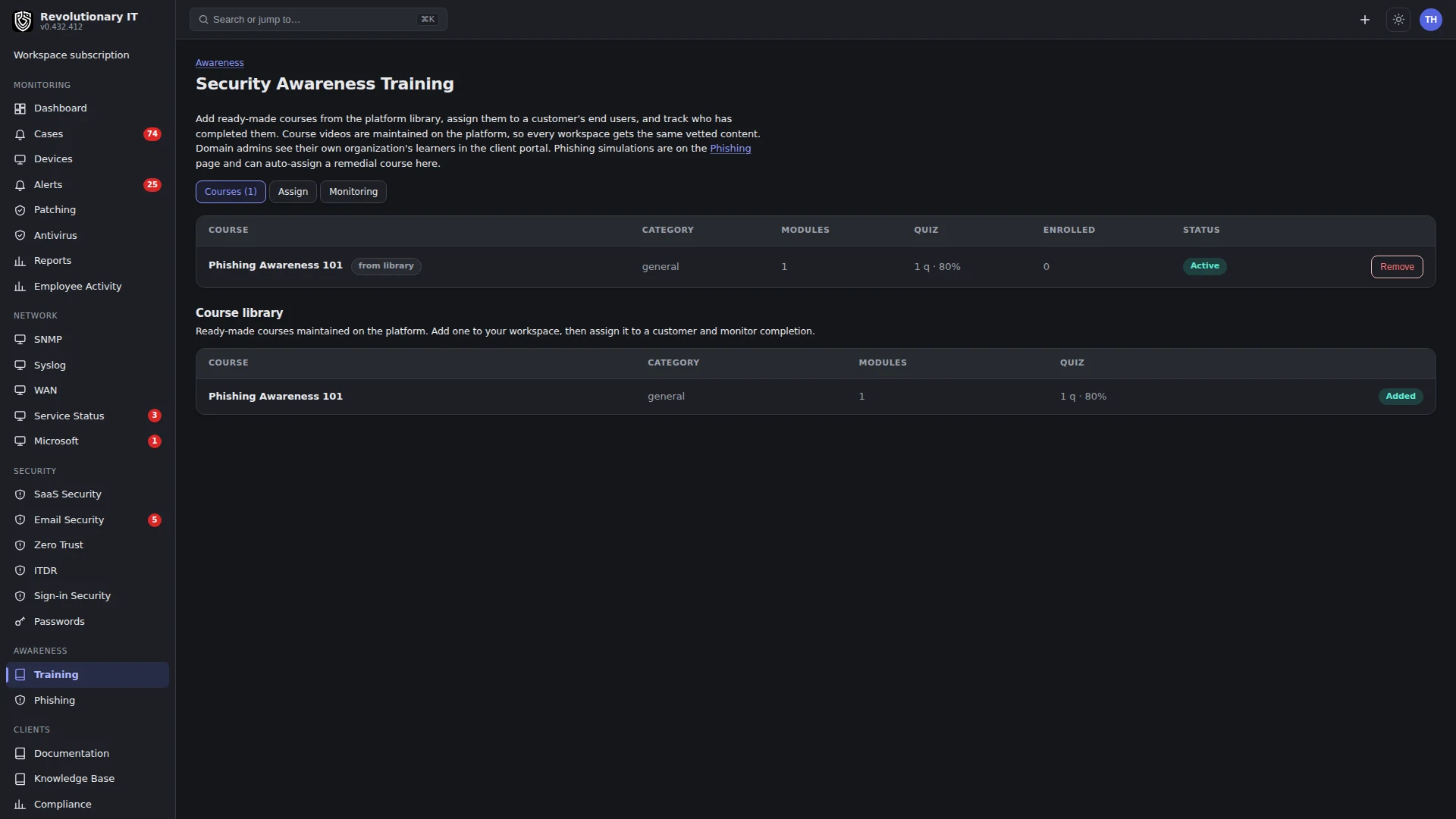
Open Awareness, Training. Courses, learner assignments and completion records are separate parts of the workflow. This recording is a guided inspection and does not assign content or establish that an end user completed training.
Open Phishing to locate simulations. Campaign recipients, sending configuration and customer permission need review before a real simulation. We do not start a campaign or send any message. A draft campaign is not a delivered simulation or a measured learning result.
Follow the written guide to select approved content and intended recipients. Verify the actual learner experience and completion evidence. For a permitted phishing exercise, reconcile sends, delivery and recorded interactions; training completion alone does not prove immunity to phishing.
What it does
Two related engines under Awareness in the sidebar:
- Training: video courses the MSP adds from the platform course library, assigns to a customer's end users, and tracks to completion. End users take them in the client portal on desktop or phone; domain admins watch their own organization, the MSP watches every customer.
- Phishing: simulated lure emails sent to a customer's end users, tracking who opens, clicks, enters credentials or reports them, with optional automatic remedial training for anyone who fails. An Email allow-list tab tells you what to allow in the customer's gateway so the mail is delivered.
How it works
Training
- A course has ordered video modules and an optional graded quiz. Videos are referenced by URL (YouTube, Vimeo, a direct MP4, or any embeddable page); course videos are not uploaded into the tenant database. Playback depends on the provider URL, its embedding permissions and the learner's network.
- Assigning a course to a customer enrolls every current active end user. Progress rolls up from module completion (the bulk) plus the quiz (the last 10% when a quiz exists). An MP4 auto-completes at 90% watched; embedded players expose no progress, so those modules have a Mark complete button. The quiz is graded against the course pass mark; a pass completes the course.
- The MSP monitors completion and overdue counts per customer on Awareness > Training > Monitoring and per course on the course page. A domain admin sees the same for their own organization on the portal Training tab.
Phishing
- A template is the lure: sender name and local part, subject, email body HTML and a teachable landing page, with the merge fields firstName, name, email and link. It can show a decoy login form (whose typed value is never read or stored) and can name a remedial course.
- A campaign pairs a template with a customer and a sending domain, and builds one target per end user. Sending renders the body with a unique tracked link and an invisible open pixel and sends from local-part@sending-domain, stamping a signature header. Select a dedicated phishing sending connection where configured. If none is selected, or the selected connection is missing or inactive, the sending path can use the workspace mailbox; verify sender authorization before sending. A send failure on an active dedicated connection is recorded as an error; it does not trigger that fallback.
- Tracking is public and host-routed: the pixel records an open, the link records a click and shows the landing (decoy login first when enabled, then the reveal), a decoy submit records that credentials were entered, and a Report button records the good outcome. A click or submit auto-enrolls the user in the template's remedial course when one is set. Reporting never triggers remediation.
- Outcomes advance forward only (a click implies an open; reported is the top state). The campaign page shows sent, opened, clicked, entered-credentials and reported counts. Sent records a successful send request, not confirmed inbox delivery; the page also shows the click rate and report rate, and a per-recipient timeline.
Email allow-list (ESG)
For sim mail to reach the inbox rather than a quarantine, the customer allow-lists the MSP's sending infrastructure in their email security gateway. The platform operator configures the sending domains, sending IPs and signature header; these are shown with copy buttons and per-gateway steps for Microsoft 365 Defender, Mimecast, Proofpoint, Barracuda, Google Workspace and other. Each customer is tracked per provider so a technician confirms it before running a campaign.
Step by step
Build and assign a course
- Awareness > Training > Courses: add a course from the Course library to your workspace with Add to workspace.
- Course videos and quizzes come from the platform course library; they are not edited in your workspace.
- Training > Assign: pick the course and customer, an optional due date, Assign. Every end user of the customer is enrolled; run it again after new users are added.
- Learners see the course on the portal Training tab and work through it; you watch progress on Monitoring and the course page.
Run a phishing simulation
- Confirm the customer has authorized the simulation and its recipient scope. Confirm its gateway is allow-listing the sending infrastructure (Phishing > Email allow-list), and mark the provider confirmed.
- Phishing > Templates > New template (or use a starter). Set the sender, subject, body, landing page, whether to show a decoy login, and a remedial course.
- Configure and test the intended sender under Administration > Apps > Phishing. Then Phishing > Campaigns > New campaign: name, customer, template, sending domain and Sending connection. The default is Workspace mailbox; choose the dedicated connection explicitly if required. It builds the target list.
- Open the campaign, review the recipients, and Send now. Watch the outcomes fill in; failures usually mean the sending domain is not authorized on the mail connection or the gateway blocked it.
Verification
- For a course with a quiz, completed modules contribute 90% and a passed quiz the final 10%. Without a quiz, completing all modules reaches 100%.
- A test phishing target moves through opened, clicked and reported as you exercise the link, and the campaign counts match.
Troubleshooting
- Sim mail not delivered: the sending domain is not allow-listed in the customer's gateway (Email allow-list tab) or is not an authorized sender on the workspace mail connection.
- A module never completes: an embedded (non-MP4) video needs the Mark complete button; only MP4 auto-completes.
- No learners enrolled on assign: the customer has no active end-user accounts yet (only end users, not MSP staff, are enrolled).